
Simple Pendulum
Loading the math board and drawing, please wait…
In collections
El dominio del Tiempo (cinemática intuitiva)
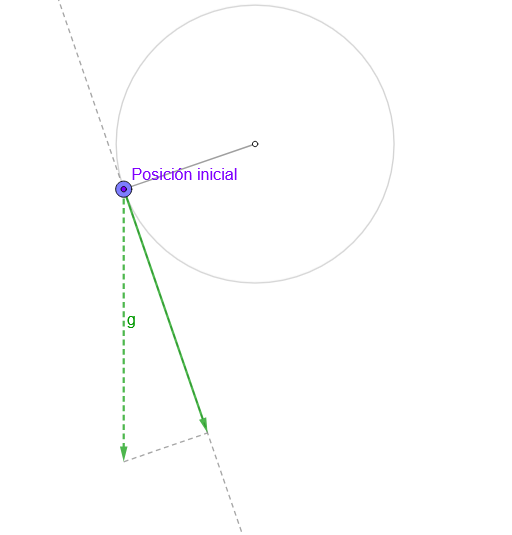
This example demonstrates a simple pendulum's motion, involving core math concepts such as motion, position, and velocity. The construction uses GeoGebra commands like Circle, Arc, Point, Segment, and objects l, O, c, arc, P, M, r, g, n, gt, s, v, reg, regDif, anima, reinicia, empieza, t0, t1, osci, T, tt, dt, T_0, amp, sum, verAmplitud, verSimétrico, f, h, P', rP, verVectores, verCircunferencia, vt, texto1, i, texto2, aux, vel. Suitable for middle school or high school math classrooms.
GeoGebra Commands & Parameters
Circle(O, l) → cArc(c, Point[c, 0.76389], Point[c, 0.25]) → arcPoint(arc) → PPoint(c) → MSegment(O, M) → rUnitOrthogonalVector(r) → nSegment(M + g, M + gt) → sIf(Length[reg] ≟ 1, {reg(1)}, Sequence[reg(k) - reg(k + 1), k, 1, Length[reg] - 1]) → regDifmean(regDif) → TAngle(P, O, (x(O), -100)) → ampSum(Sequence[((((2 * k))! / ((2^((2 * k)) * (k!)^(2))))^(2) * (sin(amp / 2))^((2 * k))), k, 0, 83]) → sumRay(O, O + (0, -1)) → fLine(P, P + (1, 0)) → hMirror(P, f) → P'Segment(O, P) → rPLine(M, gt) → i
AI Drawing Prompt Reference
Draw a simple pendulum graph. The graph includes a circle, an arc, a point, a line segment, a perpendicular vector, a line segment, a ray, a line segment, and a mirrored point. The construction order is to first draw the circle and arc, then determine the point and line segment, add the perpendicular vector and ray, and finally obtain the mirrored point. The graph shows the position and motion relationship of the pendulum.
The prompt above was compiled from the original drawing commands and is for reference only.