
Similar Triangles SSS Similarity Construction
Loading the math board and drawing, please wait…
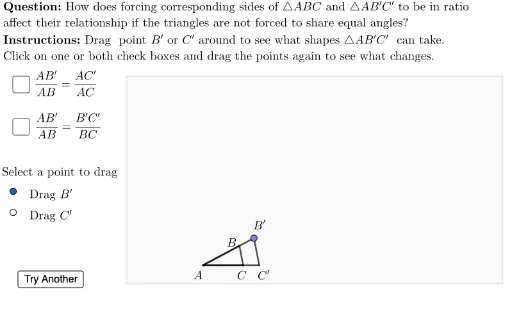
This example demonstrates how to determine triangle similarity based on side lengths. The key mathematical concepts include the definition of similar triangles, the SSS similarity criterion, and geometric construction techniques. Construction involves using GeoGebra commands such as Rotate, Polygon, Intersect, etc., to create triangles and analyze side length relationships. Suitable for middle or high school mathematics teaching to understand the principles of similar triangles and construction methods.
GeoGebra Commands & Parameters
Rotate((Random[30, 50] / 10, 0), Random[20, 100]°, A) → BPolygon(A, B, C) → t1, cLen, aLen, bLenIf(ABmaxLenCase3 > BCmaxLenCase3, sqrt(ABmaxLenCase3^(2) - BCmaxLenCase3^(2)), x(TRviewBox) - x(A)) → ACmaxLenCase3Polygon(BLviewBox, (x(BLviewBox), y(TRviewBox)), TRviewBox, (x(TRviewBox), y(BLviewBox))) → viewBox, vbLeft, vbTop, vbRight, vbBottomIntersect(Ray[A, A + (ACmaxLenCase3, BCmaxLenCase3)], viewBox) → MaxB3InRegionPolygon(A, MaxB3InRegion, (x(TRviewBox), y(MaxB3InRegion)), (x(TRviewBox), y(A))) → restrictedB3Range, f, g, h, jIf(ABmaxLenCase3 > ACmaxLenCase3, Intersect[Circle[A, ABmaxLenCase3], Ray[(ACmaxLenCase3, 0), (ACmaxLenCase3, 5)]], TRviewBox) → MaxB3If(aLen < cLen, restrictedB3Range, Polygon[(x(BLviewBox), y(A)), (x(BLviewBox), y(TRviewBox)), TRviewBox, (x(TRviewBox), y(A))]) → B3rangePointIn(B3range) → B3Circle(A, Segment[A, B3]) → cAlenAB3UnitVector(Vector[A, B]) → uABPoint(Segment[A, Intersect[Ray[A, B], viewBox]]) → B4Line(B4, Vector[B, C]) → b4LineIntersect(Ray[A, C], b4Line) → C4'UnitVector(Vector[A, C]) → uACPoint(Segment[A, Intersect[Ray[A, C], viewBox]]) → C4Polygon(A, B4, C4') → t4b, t4b_c, t4b_a, t4b_bLine(C4, Vector[C, B]) → c4LineIntersect(Ray[A, B], c4Line) → B4'Polygon(A, B4', C4) → t4c, t4c_c, t4c_a, t4c_bRay((ACmaxLenCase3, 0), (ACmaxLenCase3, 2)) → iCircle(B4, BClenCase3b) → cBlenBC4Circle(B3, BClenCase3b) → cBlenBC3Segment((C3start, y(A)), (C3end, y(A))) → C3rangePoint(C3range) → C3Circle(C3, BClenCase3b) → cC3lenBCLength(Segment[A, B3]) → ABlenCase3Intersect(cAlenAB3, cC3lenBC) → B3', B3'_1, ,Polygon(A, B3', C3) → t3c, t3c_c, t3c_a, t3c_bPointIn(viewBox) → B1Point(Segment[A, (x(TRviewBox), y(A))]) → C2Point(Segment[A, (x(TRviewBox), y(A))]) → C1Polygon(A, B1, C1) → tCase1, tCase1_c, tCase1_a, tCase1_bPointIn(viewBox) → B2Intersect(Circle[A, AClenCase2a], Ray[A, C]) → C2',Polygon(A, B2, C2') → tCase2b, tCase2b_c, tCase2b_a, tCase2b_bIntersect(Circle[A, ABlenCase2b], Ray[A, B2]) → B2',Polygon(A, B2', C2) → tCase2c, tCase2c_c, tCase2c_a, tCase2c_bIf(bActive, If[caseNum ≟ 4, B4, If[caseNum ≟ 3, B3, If[caseNum ≟ 2, B2, B1]]], If[caseNum ≟ 4, B4', If[caseNum ≟ 3, B3', If[caseNum ≟ 2, B2', B1]]]) → B'lblPointIntersect(cBlenBC3, Ray[A, C]) → C3'_1, C3'_2If(Defined[C3'_2], C3'_2, C3'_1) → C3'Polygon(A, B3, C3') → tCase3b, tCase3b_c, tCase3b_a, tCase3b_bIf(bActive, If[caseNum ≟ 4, C4', If[caseNum ≟ 3, C3', If[caseNum ≟ 2, C2', C1]]], If[caseNum ≟ 4, C4, If[caseNum ≟ 3, C3, If[caseNum ≟ 2, C2, C1]]]) → C'lblPt
AI Drawing Prompt Reference
Draw three similar triangles by first selecting three points A, B, and C to form triangle ABC. Then, construct circles with A as the center and AB, AC as radii to find intersection points B3 and C3 with side BC. Use rotation and intersection methods to find points B4 and C4, and finally form three similar triangles: △AB3C3, △AB4C4, and △ABC.
The prompt above was compiled from the original drawing commands and is for reference only.