
Similar Triangles Between Parallel Lines
Loading the math board and drawing, please wait…
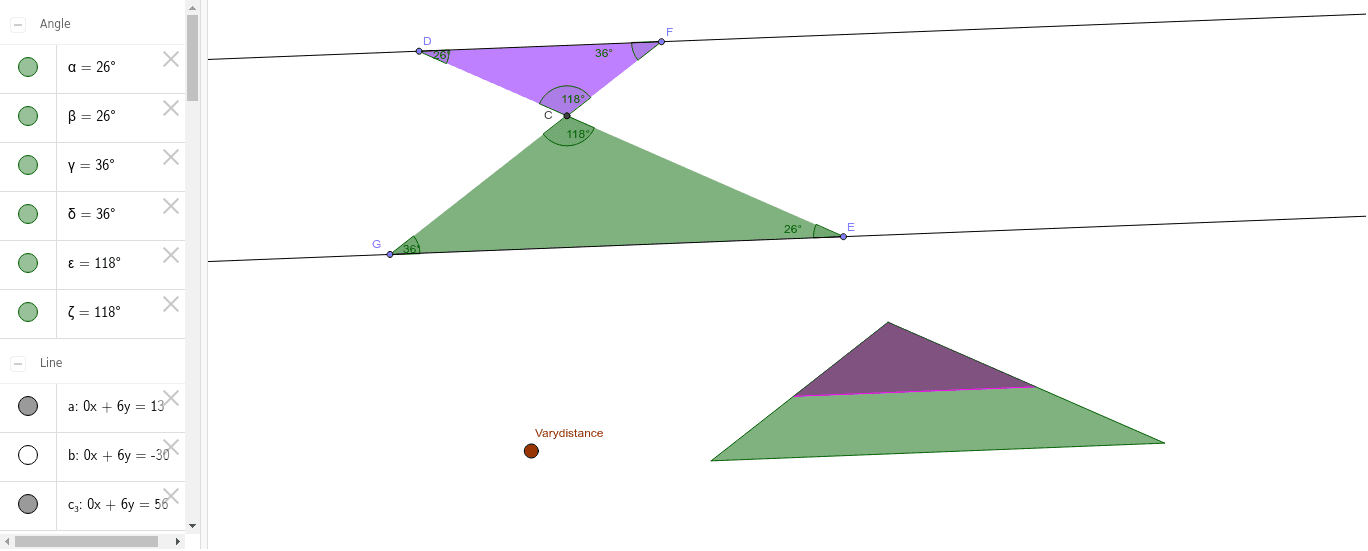
This example demonstrates the properties of similar triangles between parallel lines. Key mathematical concepts include the definition and properties of similar triangles. Using GeoGebra commands such as Line, Mirror, Point, Segment, Angle, Intersect, and Polygon, a series of similar triangles can be constructed. Suitable for teaching in middle school and above.
GeoGebra Commands & Parameters
Line(A, B) → aLine(Varydistance, a) → bMirror(Varydistance, a) → C'Line(C', a) → c_3Point(c_3) → DPoint(a) → ESegment(D, E) → dPoint(c_3) → FPoint(a) → GSegment(F, G) → eAngle(E, D, F) → αAngle(D, E, G) → βAngle(D, F, G) → γAngle(E, G, F) → δIntersect(d, e) → CAngle(F, C, D) → εAngle(G, C, E) → ζPolygon(D, C, F) → poly1, f_1, d_1, c_1Polygon(C, G, E) → poly2, e_1, c_2, gMirror(C, Varydistance) → C'_1Mirror(G, Varydistance) → G'Mirror(E, Varydistance) → E'Polygon(C'_1, G', E') → poly2', e', c'_1, g'Mirror(D, H) → D'Mirror(C, H) → c_4Mirror(F, H) → F'Polygon(D', c_4, F') → poly1', f', d', c'_2Mirror(C, H) → cMirror(G, H) → G'_1Mirror(E, H) → E'_1Polygon(c, G'_1, E'_1) → poly2'_1, e'_1, c'_3, g'_1Mirror(c, c_4) → IMirror(G'_1, c_4) → JMirror(E'_1, c_4) → KPolygon(I, J, K) → poly3, k, i, j
AI Drawing Prompt Reference
Draw two parallel lines and take points A, B on one line and C, D on the other. Connect these points to form triangles. Then use reflection to create a series of similar triangles, including triangles ABC, CDE, and EFG, as well as their reflected triangles. Finally, use intersection points to form new triangles and connect these points to create new polygons.
The prompt above was compiled from the original drawing commands and is for reference only.