
Constructing a Kite by ITfC-Edu-Team
Loading the math board and drawing, please wait…
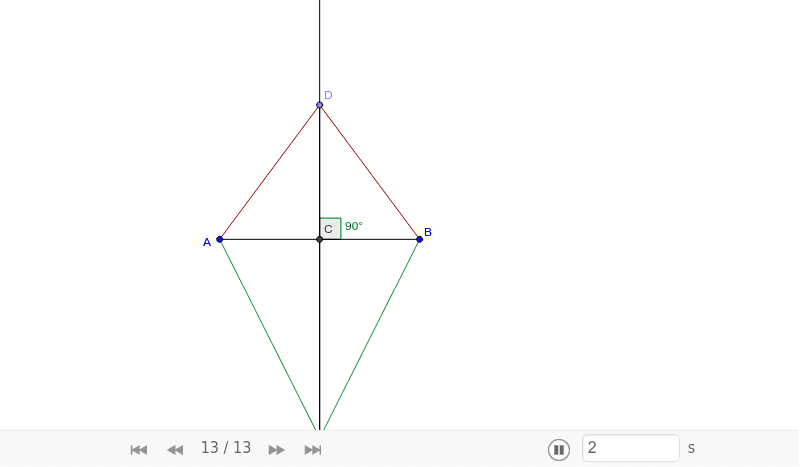
This example demonstrates how to construct a kite using GeoGebra. Key mathematical concepts include geometric construction and angles. Using commands such as Segment, Midpoint, OrthogonalLine, Point, and Angle, the kite is constructed step-by-step. Suitable for middle school and above students learning geometric construction.
GeoGebra Commands & Parameters
Segment(A, B) → aMidpoint(A, B) → COrthogonalLine(C, a) → bPoint(b) → DSegment(A, D) → cSegment(D, B) → dPoint(b) → ESegment(A, E) → eSegment(B, E) → fAngle(B, C, D) → αSegment(D, E) → g
AI Drawing Prompt Reference
Draw a kite-shaped quadrilateral. Start with a horizontal base segment and mark its midpoint. Construct a perpendicular line through this midpoint. Place two points on this perpendicular line, one on each side of the base, and connect the base endpoints to each of these points to form the upper and lower triangles of the kite. Then place a third point on the perpendicular line above the base, and connect the base endpoints to this point to form an additional triangle. Finally, connect the two points on the perpendicular line that lie on opposite sides of the base, and indicate the angle at the midpoint between the base and the perpendicular. The final figure is a symmetric kite composed of two isosceles triangles sharing the base.
The prompt above was compiled from the original drawing commands and is for reference only.