
Similar Triangles and Geometric Construction
Loading the math board and drawing, please wait…
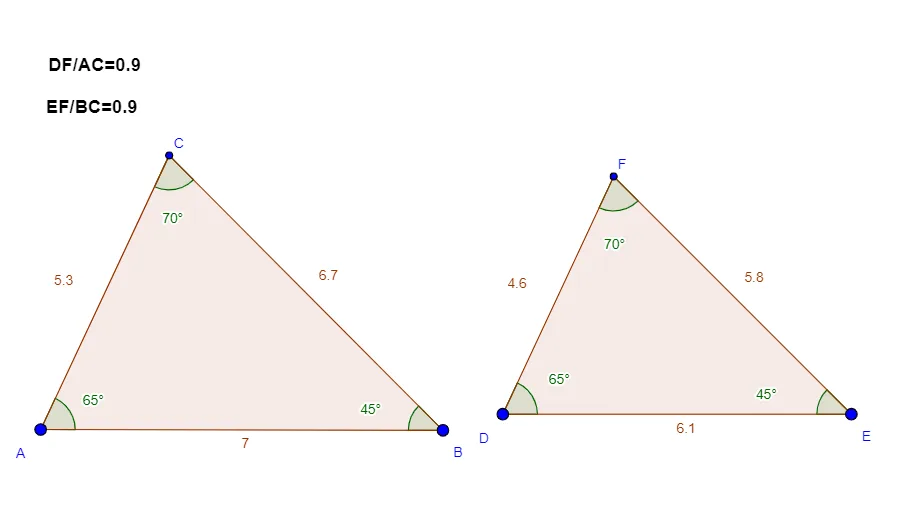
This example demonstrates the principle of triangle similarity and geometric construction methods. Key mathematical concepts include similar triangles, geometric transformations, and trigonometric functions. Construction involves using GeoGebra commands such as Segment, Rotate, Angle, etc., to build triangles, rotate, and intersect shapes. Suitable for middle or high school mathematics teaching to understand geometric relationships and transformations.
GeoGebra Commands & Parameters
Segment(A, B) → aRotate(B, 65°, A) → B'Angle(B, A, B') → αRay(A, B') → bRotate(A, (-(45°)), B) → A'Angle(A', B, A) → βRay(B, A') → cIntersect(b, c) → CPolygon(A, B, C) → poly1, c1, a1, b1Segment(D, E) → a_3Rotate(E, 65°, D) → B'_1Angle(E, D, B'_1) → α_1Ray(D, B'_1) → b_3Rotate(D, (-(45°)), E) → A'_1Angle(A'_1, E, D) → β_1Ray(E, A'_1) → c_3Intersect(b_3, c_3) → FPolygon(D, E, F) → poly1_1, c2, a2, b2Angle(A, C, B) → γAngle(D, F, E) → δText(("DF/AC=" * R1)) → text1Text(("EF/BC=" * R2)) → text2
AI Drawing Prompt Reference
Draw two similar triangles ABC and DEF. For the first triangle, start with side AB as base; from point B rotate counterclockwise 65 degrees to create an auxiliary point, and from point A rotate counterclockwise 45 degrees to create another auxiliary point. Extend rays from these points to intersect at point C, forming triangle ABC. For the second triangle, use DE as base and apply the same rotation angles to construct point F, forming another similar triangle. Label the interior angles of both triangles and display the ratio relationships DF to AC and EF to BC between corresponding sides.
The prompt above was compiled from the original drawing commands and is for reference only.