
Similar Triangle Application Example by Walch Education
Loading the math board and drawing, please wait…
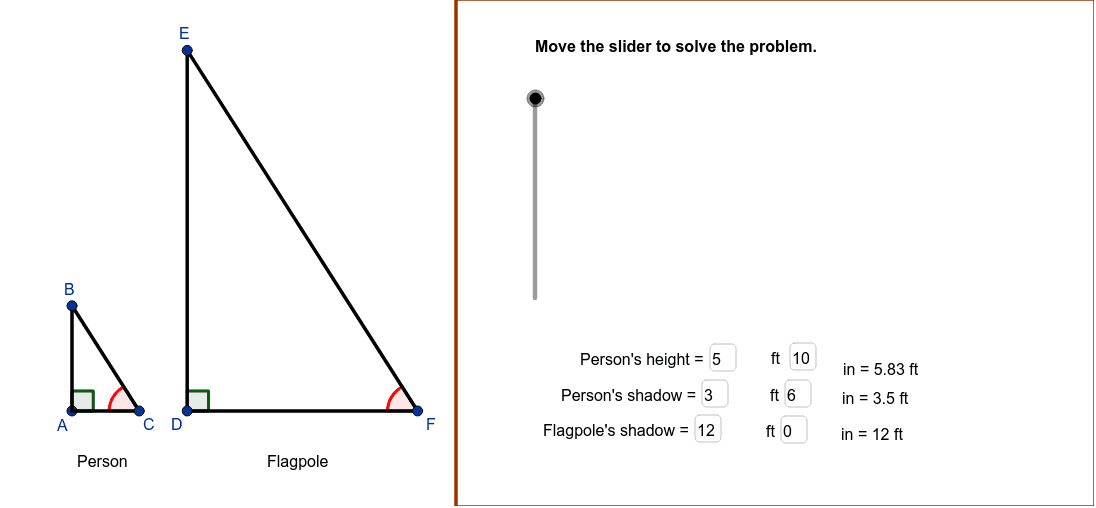
This example demonstrates the practical application of similar triangles to measure the height of an object using shadows cast at the same time of day. Key math concepts include the properties and criteria of similar triangles, proportionality, and angle measurement. GeoGebra commands and objects used in construction are Point, Line, Intersect, Polygon, Angle, Segment, Textfield. Suitable for middle school students and above learning geometric applications, physics optics, or measurement techniques.
GeoGebra Commands & Parameters
Point(xAxis) → ALine(C, B) → lineBCPoint(xAxis) → DLine(D, xA) → xDLine(F, lineBC) → lineEFIntersect(lineEF, xD) → EPolygon((14, y(Corner[1])), Corner[2], Corner[3], (14, y(Corner[4]))) → Mask, a, b, c, dAngle(C, A, B) → CABSegment(A, B) → ABSegment(C, A) → ACSegment(D, E) → DESegment(C, B) → BCAngle(B, C, A) → BCAAngle(E, F, D) → EFDAngle(F, D, E) → FDESegment(F, D) → DFSegment(E, F) → EFTextfield(ht1ft) → PersonFtTextfield(ht1in) → PersonInTextfield(shd1ft) → Shadow1ftTextfield(shd1in) → Shadow1inTextfield(shd2ft) → Shadow2ftTextfield(shd2in) → Shadow2In
AI Drawing Prompt Reference
Draw a geometric diagram showing how to measure the height of an object using similar triangles. Include two triangles, one representing the object and its shadow, and the other representing the person and their shadow, both formed under the same time and different locations in the sun. Label the vertices, sides, and angles of each triangle, especially the similar angles and corresponding sides, and add text boxes to indicate the lengths of the object and shadows. Start by drawing the basic shapes of the two triangles, then label the similar angles and corresponding sides, and finally add the text boxes.
The prompt above was compiled from the original drawing commands and is for reference only.