
Similar Transformations and Polygons
Loading the math board and drawing, please wait…
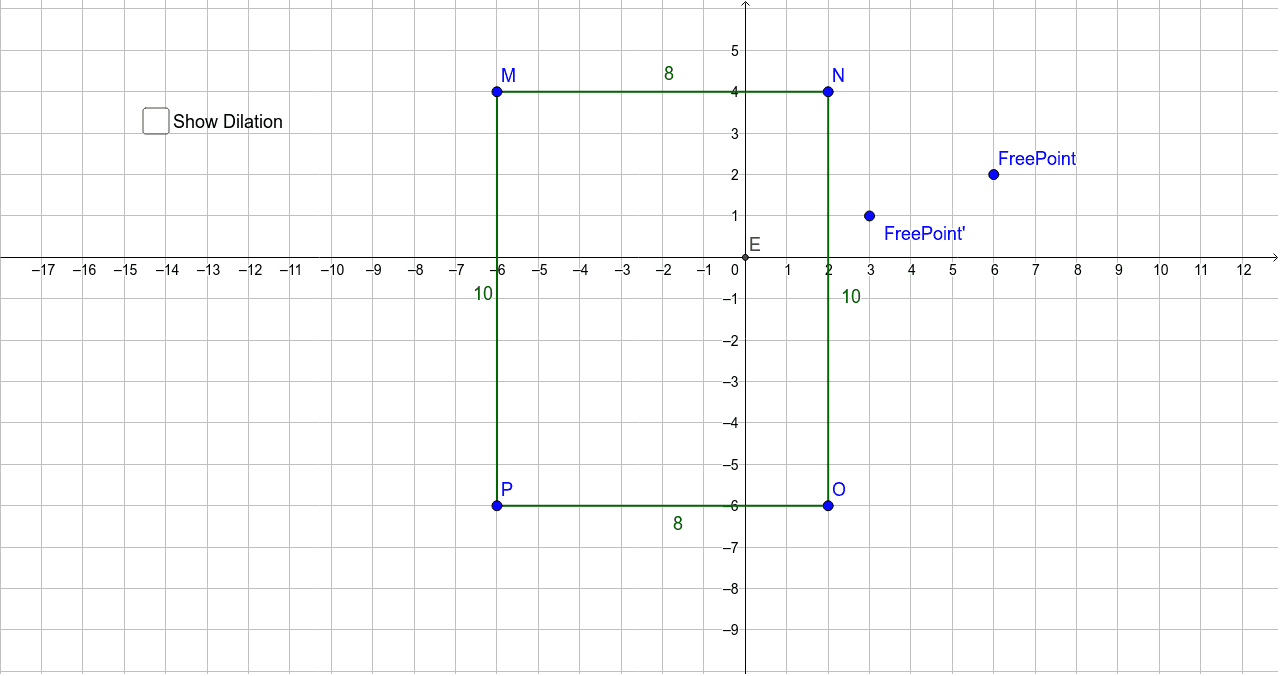
This example demonstrates how to use GeoGebra for similar transformations, particularly dilation, and observe its effects on pyramids and isosceles triangles. The core math concepts involved include similar transformations, scale factors, intersection calculations, and free points. Construction highlights involve using GeoGebra commands like Segment, Intersect, and Dilate, along with objects such as M, N, a, O, P, b, c, d, E, M', N', a', B_1, O', c', C_1, P, b, D_1, A_1, d, e, and FreePoint. Suitable for high school mathematics education to understand transformation geometry and proportional relationships.
GeoGebra Commands & Parameters
Segment(M, N) → aSegment(O, P) → bSegment(N, O) → cSegment(P, M) → dIntersect(xAxis, yAxis) → EDilate(M, 0.5, E) → M'Dilate(N, 0.5, E) → N'Segment(M', N') → a'Dilate(N, 0.5, E) → B'_1Dilate(O, 0.5, E) → O'Segment(B'_1, O') → c'Dilate(O, 0.5, E) → C'_1Dilate(P, 0.5, E) → P'Segment(C'_1, P') → b'Dilate(P, 0.5, E) → D'_1Dilate(M, 0.5, E) → A'_1Segment(D'_1, A'_1) → d'Dilate(FreePoint, 0.5, E) → FreePoint'
AI Drawing Prompt Reference
Draw a coordinate system and create a point at the intersection of the x-axis and y-axis. From this point, draw two line segments and connect their endpoints to form a closed shape. Then, dilate each line segment by half with the intersection point as the center, and connect the endpoints of the dilated segments to form a new closed shape. Finally, create a free point, dilate it by half with the intersection point as the center, and observe the similarity and proportional relationships of the shapes.
The prompt above was compiled from the original drawing commands and is for reference only.