
Similar Right Triangles and Trig Ratios
Loading the math board and drawing, please wait…
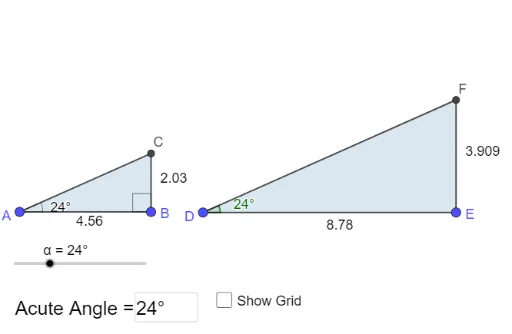
This example quickly creates right triangles by plotting two points and entering an acute angle measure. It demonstrates the properties of similar right triangles and trigonometric ratios. Commands used include Segment, OrthogonalLine, Textfield, Rotate, Angle, Ray, Intersect, Polygon. Suitable for middle school and above students learning trigonometry and geometric construction.
GeoGebra Commands & Parameters
Segment(A, B) → fOrthogonalLine(B, f) → gTextfield(α) → InputBox1Rotate(B, α, A) → B'Angle(B, A, B') → βRay(A, B') → hIntersect(g, h) → CPolygon(A, B, C) → t1, c, a, bSegment(B, C) → iSegment(C, A) → jAngle(C, B, A) → γSegment(D, E) → f_1OrthogonalLine(E, f_1) → g_1Textfield(α) → InputBox1_1Rotate(E, α, D) → B'_1Angle(E, D, B'_1) → β_1Ray(D, B'_1) → h_1Intersect(g_1, h_1) → FPolygon(D, E, F) → t1_1, c_1, a_1, b_1Segment(E, F) → i_1Segment(F, D) → j_1Angle(F, E, D) → γ_1Segment(D, E) → kSegment(E, F) → lSegment(F, D) → mAngle(E, D, F) → δ
AI Drawing Prompt Reference
Draw a right triangle quickly by plotting two points and entering an acute angle. Show the properties of similar right triangles and trigonometric ratios. Start with a line segment, then draw a perpendicular line from one endpoint. Input an acute angle, rotate the segment around the other endpoint to this angle to form a second right triangle. Label the three angles and three sides of both triangles and calculate trigonometric values.
The prompt above was compiled from the original drawing commands and is for reference only.