
Similar Rectangles: Interactive Proportionality Practice
Loading the math board and drawing, please wait…
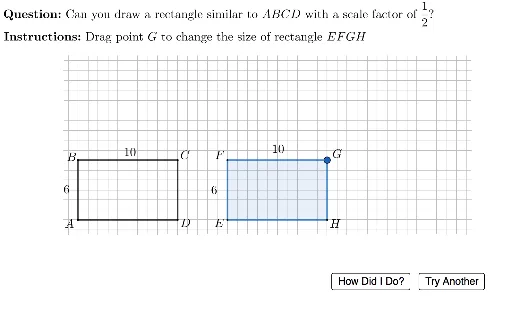
This GeoGebra example provides an interactive exercise on identifying similar rectangles and understanding their proportional side relationships. It demonstrates that two rectangles are similar if their corresponding side ratios are equal, reinforcing the concept of similarity transformations. The construction uses random generation of rectangle dimensions, conditional logic (If) to create varied questions, UnicodeToLetter for labeling, Polygon to draw rectangles, PointIn and Intersect for click detection, and Segment for auxiliary lines. Sliders like currScale allow dynamic scaling. Suitable for middle school to high school geometry classes, this tool helps students practice ratio comparisons and receive immediate feedback, making it ideal for classroom activities or self-study.
GeoGebra Commands & Parameters
Random(2, 5) → currScaleRandom(0, 1) → currTypeRandom(2, floor(33 / (currScale + 1))) → smallWidthIf(currType ≟ 0, smallWidth, largeWidth) → ABCDwidthUnicodeToLetter(10003) → cmarkRandom(1, floor(16 / currScale)) → smallHeightIf(currType ≟ 0, smallHeight, largeHeight) → ABCDheightIf(currType ≟ 0, largeHeight, smallHeight) → EFGHheightIf(currType ≟ 0, largeWidth, smallWidth) → EFGHwidthLaTeX(If[currType ≟ 0, ("\vphantom\dfrac{2}{2}" * currScale), (("\dfrac{1}{" * currScale) * "}")]) → scaleFactorDispPolygon(E + (1, 1), E + (1, maxDragHeight), E + (maxDragWidth, maxDragHeight), E + (maxDragWidth, 1)) → polyRegion, f, g, h, iLaTeX((("\text{\textbf{Question: }Can you draw a rectangle similar to \(ABCD\) with a scale factor of }" * scaleFactorDisp) * "? ")) → MainInstrucPointIn(polyRegion) → GIntersect(Line[E, yAxis], Line[G, xAxis]) → FIntersect(Line[E, xAxis], Line[G, yAxis]) → HPolygon(E, F, G, H) → studentQuad, e, f_1, g_1, h_1Polygon({E, E + (0, EFGHheight), E + (EFGHwidth, EFGHheight), E + (EFGHwidth, 0)}) → correctQuadSegment(A, B) → abSegment(B, C) → bcSegment(C, D) → cdSegment(A, D) → adLaTeX("\text{\textbf{Instructions: }Drag point \(G\) to change the size of rectangle \(EFGH\)}") → SpecInstrucLaTeX((((((((("\text{\textcolor{#1b5e20}{" * correct) * "} The scale factor is \( ") * scaleFactorDisp) * " \), so the new height is \(") * EFGHheight) * " \) and the new width is \(") * EFGHwidth) * " \).}")) → fbCorrectLaTeX((((((((((((((((("\text{\textcolor{#d32f2f}{" * incorrect) * "}Since the scale factor is \(") * scaleFactorDisp) * "\), the new height will be \(") * scaleFactorDisp) * " \times ") * ABCDheight) * " = ") * EFGHheight) * "\), and the new } \\ \text{width will be \(") * scaleFactorDisp) * " \times ") * ABCDwidth) * "=") * EFGHwidth) * "\). Please try again.}")) → fbWrong
AI Drawing Prompt Reference
Please draw an interactive geometry exercise graphic that includes a randomly generated rectangle ABCD and a student-drawn rectangle EFGH. Students can drag point G to change the size of rectangle EFGH. The graphic should display the correct rectangle and an incorrect rectangle, along with explanatory text. Focus on demonstrating the proportional relationship of similar rectangles and dynamic scaling effects.
The prompt above was compiled from the original drawing commands and is for reference only.