
Similar Polygons and Scale Factor by Azucena Overman
Loading the math board and drawing, please wait…
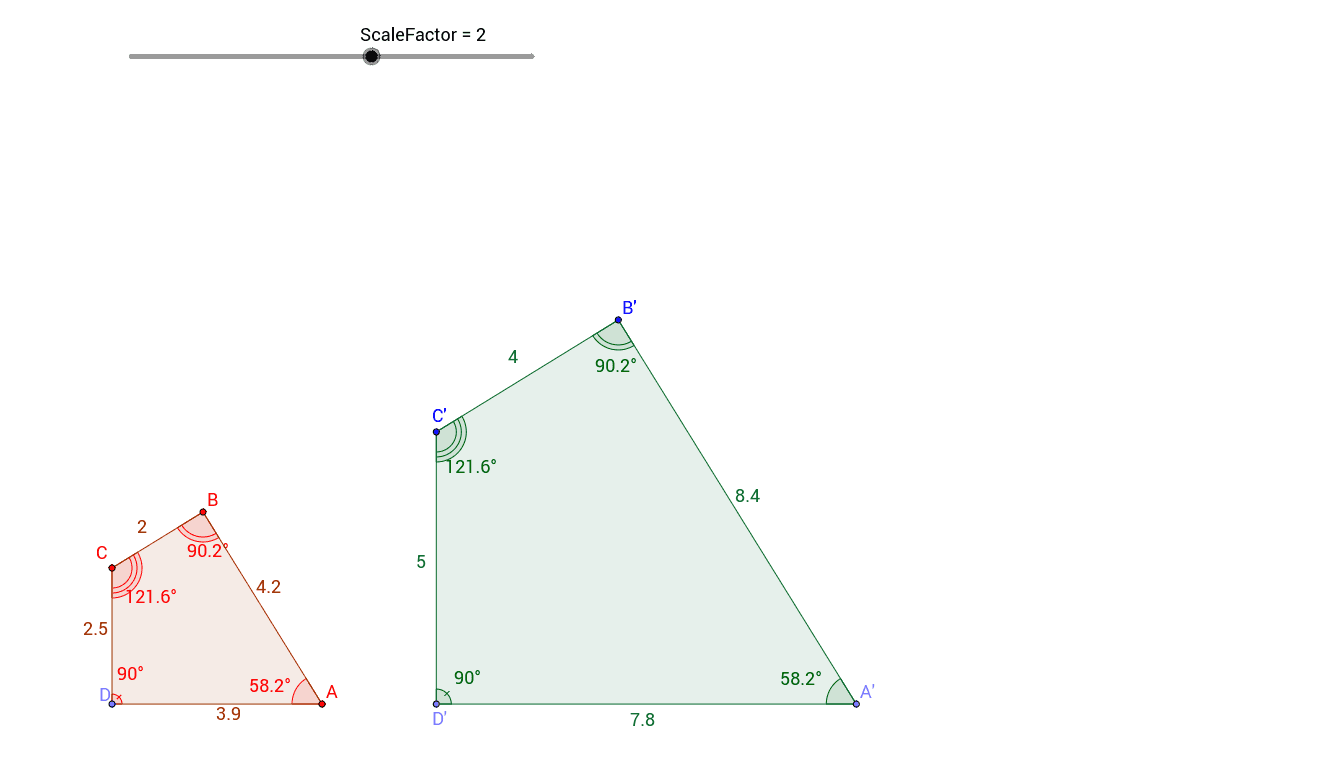
This example demonstrates how lengths of polygons change while angles remain congruent for different scale factors. Using GeoGebra commands such as Point, Polygon, Vector, Translate, Dilate, and Angle, students can visually understand the concept of similar polygons. Suitable for middle school and above students learning geometric transformations.
GeoGebra Commands & Parameters
Point(xAxis) → APoint(xAxis) → DPolygon(A, B, C, D) → poly1, a, b, c, dIntersect(xAxis, yAxis) → EVector(D, E) → uTranslate(A, u) → A1Translate(B, u) → B1Translate(C, u) → C1Translate(D, u) → D1Polygon(A1, B1, C1, D1) → poly1', a', b', c', d'Dilate(A1, ScaleFactor, E) → A'Dilate(B1, ScaleFactor, E) → B'Dilate(C1, ScaleFactor, E) → C'Dilate(D1, ScaleFactor, E) → D'Polygon(A', B', C', D') → poly1'', a'', b'', c'', d''Angle(poly1) → α, β, γ, δAngle(poly1'') → ε, ζ, η, θ
AI Drawing Prompt Reference
Draw a quadrilateral ABCD, then create a vector u from the intersection of the x-axis and y-axis. Translate quadrilateral ABCD to get A1B1C1D1, then dilate A1B1C1D1 with a scale factor centered at the intersection point E to get A'B'C'D'. Finally, measure the corresponding angles of the two quadrilaterals.
The prompt above was compiled from the original drawing commands and is for reference only.