
Side Side Angle Demonstration
Loading the math board and drawing, please wait…
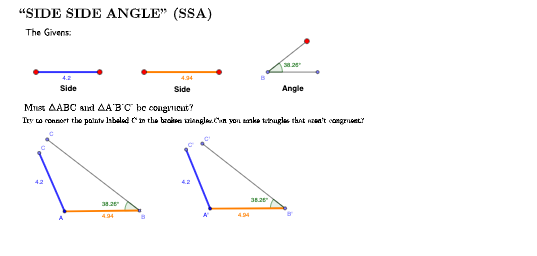
This example demonstrates the diversity of triangle constructions under SSA (Side Side Angle) conditions. It involves core math concepts like trigonometry, triangle congruence criteria, and geometric construction. Key GeoGebra commands used include Line, Point, Circle, Angle, Segment, Rotate, and Ray for dynamic adjustments. Suitable for high school mathematics instruction to explore different solution cases in SSA scenarios.
GeoGebra Commands & Parameters
Line(A, B) → aPoint(a) → EPoint(a) → FPoint(a) → HCircle(E, F) → dPoint(d) → JAngle(F, E, J) → βSegment(E, J) → hSegment(E, F) → iPoint(a) → GPoint(a) → LSegment(G, L) → ePoint(a) → CPoint(a) → DSegment(C, D) → bCircle(K, b) → cCircle(N, b) → fCircle(K, b) → gCircle(N, b) → kPoint(g) → ISegment(K, I) → jPoint(k) → MSegment(N, M) → mCircle(K, e) → pCircle(N, e) → qPoint(p) → OSegment(K, O) → nPoint(q) → PSegment(N, P) → rRotate(K, (-β), I) → K'Angle(K, I, K') → αRotate(N, (-β), M) → N'Angle(N, M, N') → γRay(I, K') → sRay(M, N') → tPoint(s) → QPoint(t) → RSegment(I, Q) → a_1Segment(M, R) → b_1
AI Drawing Prompt Reference
Draw a triangle to demonstrate various constructions under SSA conditions. Start by drawing a line segment and marking points on it. Draw a circle centered at one point, intersecting the segment at another point. Measure the angle between the points and the center, then draw a perpendicular segment. Next, draw circles with the segment as radius, intersecting the segment at two points. Rotate one intersection point, measure the rotation angle, and draw rays to complete the construction.
The prompt above was compiled from the original drawing commands and is for reference only.