
Side Angle Side (SAS) Triangle Congruence
Loading the math board and drawing, please wait…
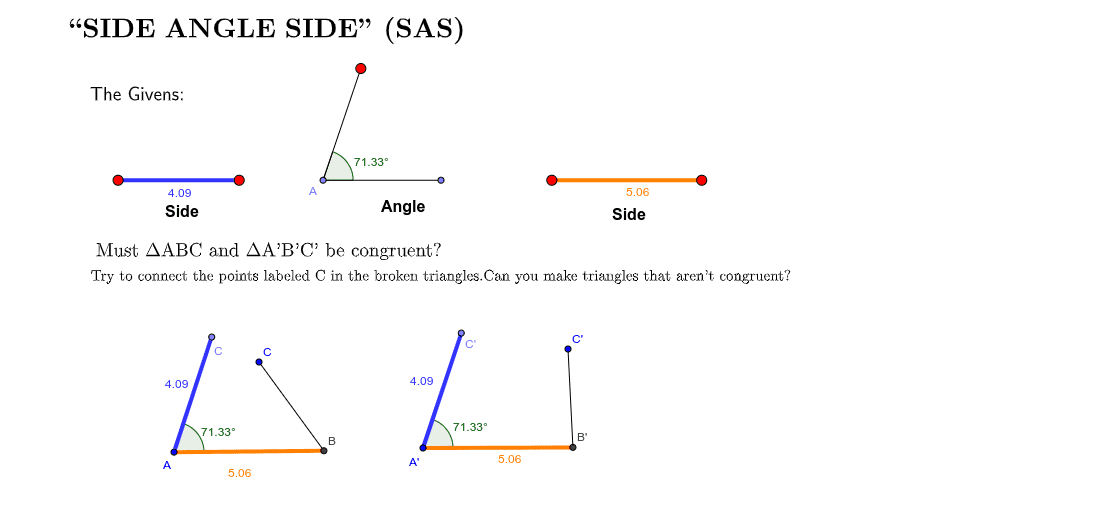
This example demonstrates constructing triangles using the Side Angle Side (SAS) congruence criterion and exploring triangle congruence properties. Key math concepts include triangle congruence, SAS relationships, and geometric constructions. It utilizes commands like Line, Point, Circle, Angle, Segment, Rotate, Ray, and Intersect in GeoGebra. Suitable for middle school and above, ideal for teaching geometric proofs and dynamic geometry visualization.
GeoGebra Commands & Parameters
Line(A, B) → aPoint(a) → EPoint(a) → FPoint(a) → HCircle(E, F) → dPoint(d) → JAngle(F, E, J) → βSegment(E, J) → hSegment(E, F) → iPoint(a) → GPoint(a) → LSegment(G, L) → ePoint(Circle[K, abs(e)]) → MSegment(K, M) → jPoint(Circle[N, abs(e)]) → OSegment(N, O) → kPoint(a) → CPoint(a) → DSegment(C, D) → bRotate(M, (-β), K) → M'Angle(M, K, M') → αRotate(O, (-β), N) → O'Angle(O, N, O') → γCircle(K, b) → cCircle(N, b) → fRay(K, M') → gRay(N, O') → mIntersect(c, g) → I,Intersect(f, m) → P,Segment(K, I) → nSegment(N, P) → pSegment(I, Q) → qSegment(P, R) → r
AI Drawing Prompt Reference
Draw a triangle to demonstrate the Side Angle Side (SAS) congruence theorem. Start by drawing a line segment and marking points on it. Use one point as a center to draw a circle, creating intersections that form an angle. Construct another triangle using rotations and circle intersections, ensuring it meets the SAS criteria with the first triangle. Connect key points to form two congruent triangles, highlighting the sides and angles to clearly show the congruence.
The prompt above was compiled from the original drawing commands and is for reference only.