
SHM and UCM: Multiple Projection
Loading the math board and drawing, please wait…
In collections
The Domain of the Time (intuitive kinematics)
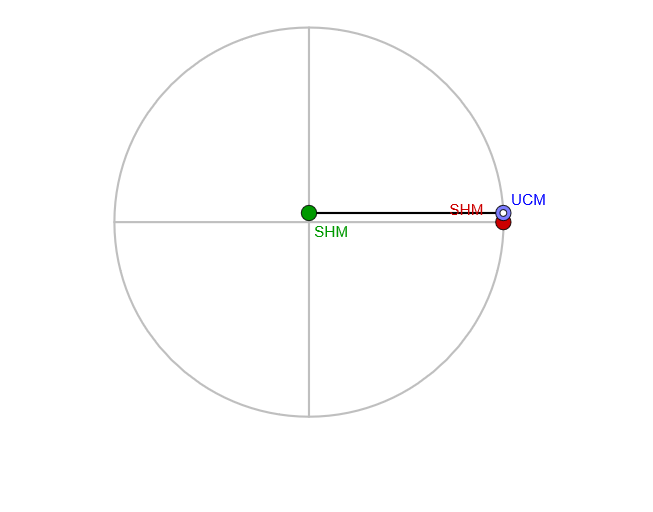
This example demonstrates multiple projections of simple harmonic motion and uniform circular motion, highlighting periodic motion in different perspectives. Key mathematical concepts include vectors, rotation, projection, and symmetry. Construction involves GeoGebra commands like Circle, Rotate, Intersect, and Sequence, suitable for high school mathematics or geometric learning.
GeoGebra Commands & Parameters
Circle(O1, amplitud) → c1Point(c1) → A1Circle(A1 / 2, amplitud / 2) → cSegment(O1 + (amplitud, 0), O1 + ((-amplitud), 0)) → diaH1Sequence(Rotate[diaH1, k, O1], k, pi / 50, pi, pi / 50) → dia1Sequence(Intersect[dia1(k), OrthogonalLine[A1, dia1(k)]], k, 1, Length[dia1]) → proy1Segment(A1, A2) → p1Segment(O2, A2) → s2Rotate(Segment[O2 + (amplitud / 2, 0), O2 + (((-amplitud)) / 2, 0)], (20 * pi / 50), O2) → dia2Intersect(dia2, OrthogonalLine[A2, dia2]) → A3Circle(O2, amplitud / 2) → c2Circle(O3, amplitud / 4) → c3Segment(O3, A3) → s3Segment(O1, A1) → s1Rotate(Segment[O3 + (amplitud / 4, 0), O3 + (((-amplitud)) / 4, 0)], (25 * pi / 50), O3) → dia3Intersect(dia3, OrthogonalLine[A3, dia3]) → A4Circle(O4, amplitud / 8) → c4Segment(O4, A4) → s4Rotate(Segment[O4 + (amplitud / 8, 0), O4 + (((-amplitud)) / 8, 0)], (30 * pi / 50), O4) → dia4Intersect(dia4, OrthogonalLine[A4, dia4]) → A5Circle(O5, amplitud / 16) → c5Rotate(Segment[O5 + (amplitud / 16, 0), O5 + (((-amplitud)) / 16, 0)], (35 * pi / 50), O5) → dia5Intersect(dia5, OrthogonalLine[A5, dia5]) → A6Circle(O6, amplitud / 32) → c6Rotate(Segment[O6 + (amplitud / 32, 0), O6 + (((-amplitud)) / 32, 0)], (40 * pi / 50), O6) → dia6Circle(O7, amplitud / 64) → c7PolyLine(O1, O2, O3, O4, O5, O6, O7) → pol
AI Drawing Prompt Reference
Create a geometric diagram showing multiple projections of simple harmonic motion and uniform circular motion. Start with a large circle on the left with a fixed horizontal diameter, and place a point on this circle as the starting point. Drop a perpendicular projection line from this point to create the first point on the next level. Using this point as center, draw another circle with half the radius, then rotate its diameter by a certain angle and project downward again. Continue this process with each subsequent circle having half the radius of the previous one (1/2, 1/4, 1/8, 1/16, 1/32, 1/64), while the rotation angle of each diameter increases progressively. Connect all centers with a polyline to form a multi-layered projection structure. The entire figure demonstrates mathematical concepts of vectors, rotation, projection, and symmetry, presenting periodic motion from different perspectives.
The prompt above was compiled from the original drawing commands and is for reference only.