
Shell Construction Demo
Loading the math board and drawing, please wait…
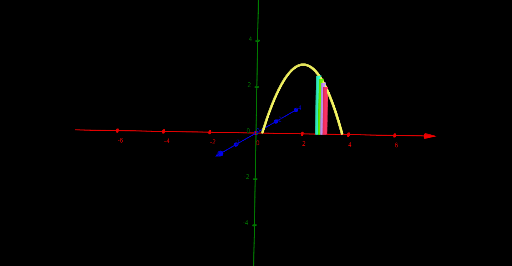
This example dynamically demonstrates the generation process of a shell shape, involving core math concepts like multiplication, binomial distribution, quadrilaterals, tangent function, and statistics. It utilizes commands such as Segment, Root, Line, CurveCartesian, Rotate, and Surface in GeoGebra for construction, making it suitable for high school and above learners interested in parametric equations, transformations, and geometric constructions.
GeoGebra Commands & Parameters
Segment(A, B) → gRoot(f) → C, DLine((0, 0, 0), (0, 1, 0)) → hCurveCartesian(t, f(t), t, x(C), x(D)) → cRotate(A, a, h) → A'Rotate(B, a, h) → B'Segment(A', B') → g'Segment((b + 0.1, f(b + 0.1)), (b + 0.1, 0)) → iSegment((b - 0.1, f(b - 0.1)), (b - 0.1, 0)) → jRotate(i, a, h) → i'Rotate(j, a, h) → j'Segment((b - 0.2, f(b - 0.2)), (b - 0.2, 0)) → kRotate(k, a, h) → k'Surface(c, e, yAxis) → d
AI Drawing Prompt Reference
Draw a shell shape by first drawing a line segment g between two points A and B. Then find the roots C and D of function f, and draw a line h through the origin. Next, draw a curve c. Rotate points A and B around line h to get A' and B', and draw line segment g'. Draw line segments i from (b+0.1, f(b+0.1)) to (b+0.1, 0) and j from (b-0.1, f(b-0.1)) to (b-0.1, 0), then rotate i and j to get i' and j'. Draw line segment k from (b-0.2, f(b-0.2)) to (b-0.2, 0), and rotate k to get k'. Finally, based on curve c, e, and the y-axis, draw surface d.
The prompt above was compiled from the original drawing commands and is for reference only.