
Shaded Area of Venn Diagrams
Loading the math board and drawing, please wait…
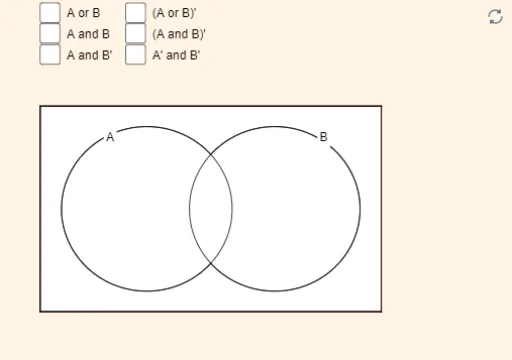
This example demonstrates the shaded area for certain combinations of sets A and B. Key mathematical concepts include set theory and geometric construction. It uses commands like Polygon, Circle, Intersect, CircleArc, Point, and Locus in GeoGebra. Suitable for high school math education and learning.
GeoGebra Commands & Parameters
Polygon(A, B, C, D) → poly1, a, b, c_2, dCircle(E, 2) → eCircle(F, 2) → fIntersect(a, d) → GIntersect(c_2, d) → HPolygon(G, H, I, J) → poly2, g, h, i, jCircle(E, 2) → pCircle(F, 2) → qCircle(E, 2) → rCircle(F, 2) → sIntersect(e, f, 1) → KIntersect(e, f, 2) → LCircleArc(E, L, K) → tCircleArc(F, K, L) → cPoint({c, t}) → Mit1Locus(Mi1, Mit1) → loc1CircleArc(E, K, L) → c_1Point({c_1, c}) → Mit2Locus(Mi2, Mit2) → loc2CircleArc(F, L, K) → d_1Point({d_1, t}) → Mit3Locus(Mi3, Mit3) → loc4Intersect(a, d) → MIntersect(c_2, d) → NPolygon(M, N, O, P) → poly3, m_1, n_1, o_1, p_1Intersect(a, d) → QIntersect(c_2, d) → RIntersect(b, c_2) → SIntersect(a, b) → TPolygon(Q, R, S, T) → poly4, q_1, r_1, s_1, t_1
AI Drawing Prompt Reference
Draw two intersecting circles and label their intersection. Inside one circle, draw a quadrilateral that partially covers the intersection area. Then, draw another quadrilateral outside the intersection area, partially overlapping the first one. Finally, draw two circular arcs on the boundaries of the circles, connecting their intersection points to form two closed paths.
The prompt above was compiled from the original drawing commands and is for reference only.