
Segments and Midpoint Dynamic Geometry Construction
Loading the math board and drawing, please wait…
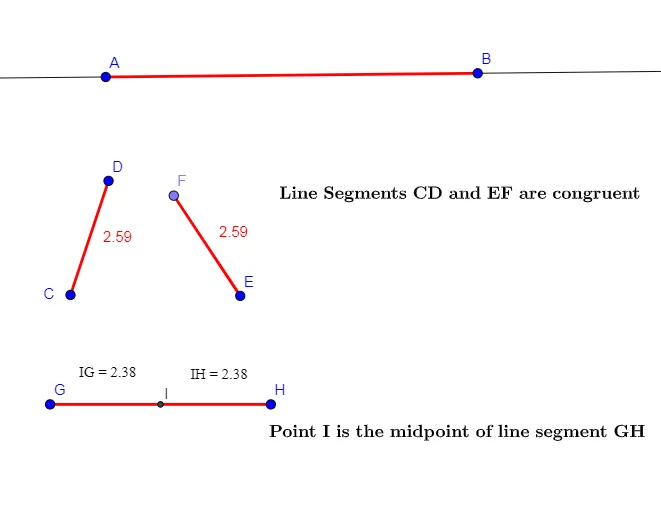
This example demonstrates the dynamic construction of a line segment and its midpoint in a plane geometry setting. Core mathematical concepts include line segments, midpoints, point-to-point distance, and basic relationships among points, lines, and circles. The construction relies on GeoGebra commands such as Point to create points A, B, C, D, and others; Segment and Line to draw segments and straight lines; Circle as an auxiliary object; Midpoint to generate the segment midpoint; and Distance to measure and display lengths, with text objects texto1 through texto6 labeling quantities such as distance IG and distance IH. It is suitable for middle school geometry instruction, high school analytic geometry review, or as an introductory demonstration of GeoGebra dynamic geometric construction.
GeoGebra Commands & Parameters
Line(A, B) → fSegment(A, B) → gSegment(C, D) → hCircle(E, h) → cPoint(c) → FSegment(E, F) → iSegment(G, H) → jMidpoint(j) → IDistance(I, H) → distânciaIHDistance(I, G) → distânciaIG
AI Drawing Prompt Reference
Draw a plane geometry figure with line segments AB and CD, and their midpoint I. First, draw line segments AB and CD. Then, draw a circle with CD as its diameter, intersecting CD at point F. Connect EF to form a segment. Next, draw line segment GH and find its midpoint I. Measure and display the distances from I to H and G as distanceIH and distanceIG.
The prompt above was compiled from the original drawing commands and is for reference only.