
Sections of Triangular Pyramids by S Sharma
Loading the math board and drawing, please wait…
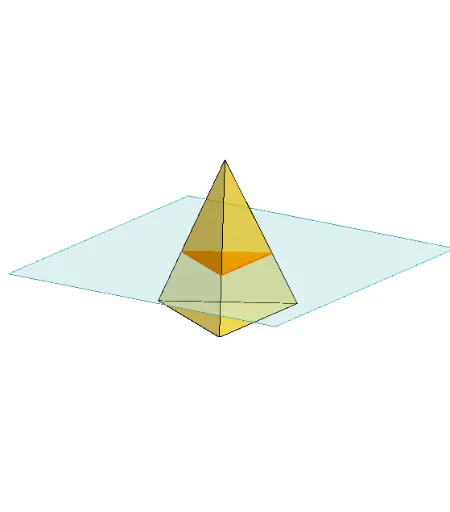
This example demonstrates different sections of a triangular pyramid. Key mathematical concepts include the properties of sections in solid geometry. Using GeoGebra commands such as Polygon, PointIn, Translate, Rotate, etc., the changes in sections can be dynamically shown. Suitable for high school math education or self-study.
GeoGebra Commands & Parameters
Polygon(B + (-2, -2), B + (2, -2), B + (2, 2), B + (-2, 2)) → poly3, e, f, g, iPointIn(poly3) → CTranslate((0, 0, 0), Vector[B, C]) → APolygon(A + (-4, -4), A + (4, -4), A + (4, 4), A + (-4, 4)) → poly1, a, b, c, dRotate(Rotate[Translate[poly1, Vector[A, A + (0, 0, h)]], (90° * s), A + (0, 0, h), yAxis], (90° * t), A, zAxis) → poly2Pyramid(Polygon[(-2, 0, 0), Rotate[(-2, 0, 0), 120°, zAxis], Rotate[(-2, 0, 0), -120°, zAxis]], (0, 0, 4)) → m, face1, face2, face3, edge1, edge2, edge3Rotate(D, 120°, (0, 0, 0)) → EPolygon(D, E, 3, xOyPlane) → poly4, j, k, l, FPointIn(poly2) → GPointIn(poly2) → HPointIn(poly2) → IPlane(G, I, H) → nIntersectPath(n, m) → poly6, poly5, r, a_1, b_1, c_1, K, L_1, O, P, J, L, p, qRotate(m, 0, zAxis) → m'Rotate(m, 0, zAxis) → m'_1OrthogonalLine(A, n) → d_1
AI Drawing Prompt Reference
Draw a 3D triangular pyramid with an equilateral triangle base and apex directly above. Inside the pyramid, place a rotatable rectangular plane defined by three points on an internal rectangle, and show its intersection lines with the pyramid faces, forming a polygonal cross-section. Also draw an external rectangle parallel to the base and a regular polygon obtained by rotating the base triangle, to illustrate section variations. Include a perpendicular line from the apex to the section plane.
The prompt above was compiled from the original drawing commands and is for reference only.