
Sections of Cones by S Sharma
Loading the math board and drawing, please wait…
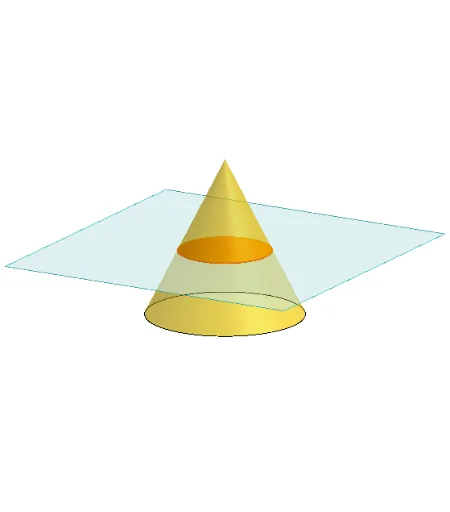
This example demonstrates different sections of a cone. Key mathematical concepts include the properties of sections in solid geometry. Using GeoGebra commands such as Polygon, PointIn, Translate, Rotate, and Cone, it dynamically shows the changes in sections. Suitable for high school mathematics education and learning.
GeoGebra Commands & Parameters
Polygon(B + (-2, -2), B + (2, -2), B + (2, 2), B + (-2, 2)) → poly3, e, f, g, iPointIn(poly3) → CTranslate((0, 0, 0), Vector[B, C]) → APolygon(A + (-4, -4), A + (4, -4), A + (4, 4), A + (-4, 4)) → poly1, a, b, c, dRotate(Rotate[Translate[poly1, Vector[A, A + (0, 0, h)]], (90° * s), A + (0, 0, h), yAxis], (90° * t), A, zAxis) → poly2Rotate(D, 120°, (0, 0, 0)) → ECone((0, 0, 0), (0, 0, 4), 2) → m, e_1, oPolygon(D, E, 3, xOyPlane) → poly4, j, k, l, FPointIn(poly2) → GPointIn(poly2) → HPointIn(poly2) → IPlane(G, I, H) → nIntersectPath(n, m) → poly6OrthogonalLine(A, n) → d_1Ends(m) → g_1, g_1_1
AI Drawing Prompt Reference
Draw a cone and demonstrate its different sections. Start by creating a rectangle, then select a random point inside it and translate it to the intersection of the diagonals. Next, draw a square centered at this point and rotate it. Also, draw a triangle and rotate it by 120 degrees. Finally, intersect the cone with the rotated square and triangle to display various cross-sections of the cone.
The prompt above was compiled from the original drawing commands and is for reference only.