
Scalar Multiplication: Vector Scaling Demonstration
Loading the math board and drawing, please wait…
In collections
Modeling Vectors
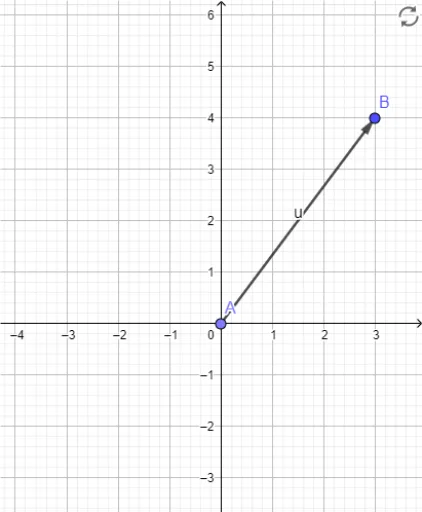
①This GeoGebra example dynamically demonstrates the geometric effect of multiplying a vector by a scalar, showing how the vector's direction remains unchanged (or reverses) while its length scales proportionally. ②Core mathematical concept is scalar multiplication of vectors, involving changes in vector magnitude, direction preservation or reversal, and the influence of the scalar coefficient on vector stretching or shrinking. ③Construction highlights: using the Point command to create points A and B, the Vector command to construct vector u (from A to B), and a scalar parameter (e.g., slider) to control the scaling factor, visually displaying the resulting vector after multiplying u by different scalars. ④Suitable for high school or early college vector lessons, useful for understanding the geometric meaning of scalar multiplication, foundations of linear combinations, and dynamically exploring how the sign and magnitude of the scalar affect direction and length.
GeoGebra Commands & Parameters
Point(yAxis) → AVector(A, B) → u
AI Drawing Prompt Reference
On a coordinate plane, place a point on the vertical axis as the starting point, and choose another point in the plane as the ending point. Draw an arrowed vector from the start to the end. Then add a slider to control a numeric parameter. As this parameter changes, the original vector is scaled by that value: if positive, the direction stays the same and the length scales proportionally; if negative, the direction reverses and the length scales by the absolute value. The figure should clearly show both the original and scaled vectors, highlighting how the scalar affects length and direction.
The prompt above was compiled from the original drawing commands and is for reference only.