
SAS Triangle Exploration
Loading the math board and drawing, please wait…
In collections
Triangle Congruency Exploration
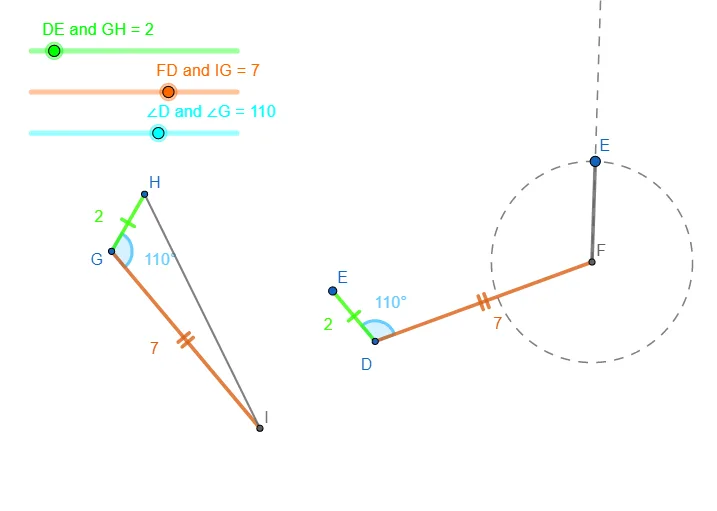
This example demonstrates constructing triangles using SAS (Side-Angle-Side) criteria and exploring their properties. It involves core mathematical concepts like triangle construction, angle measurement, and geometric transformations. Key GeoGebra commands used include Circle, Point, Segment, Rotate, Angle, Ray, and Intersect. Suitable for middle school and above students learning geometric constructions and triangle properties.
GeoGebra Commands & Parameters
Circle(G, s1) → cPoint(c) → HCircle(G, s2) → dSegment(G, H) → fRotate(H, (-(a1°)), G) → B'Angle(B', G, H) → αRay(G, B') → gIntersect(d, g, 1) → ISegment(G, I) → hSegment(I, H) → iCircle(D, s1) → ePoint(e) → ESegment(D, E) → jRotate(E, (-(a1°)), D) → E'Angle(E', D, E) → βCircle(D, s2) → kRay(D, E') → lIntersect(k, l, 1) → FSegment(D, F) → mSegment(F, G_{1}) → nCircle(F, G_{1}) → pRay(F, G_{1}) → q
AI Drawing Prompt Reference
Draw two triangles constructed with the same side-angle-side measurements. For the first triangle, start with a point as center, draw a circle with a given radius, pick a point on the circle, and connect it to the center to form one side. Rotate that point around the center by a fixed angle, draw a ray from the center in that direction, and intersect it with another circle of a different radius. Connect the intersection to the center and to the first point to complete the triangle. Repeat the same steps with a different center and radii but the same angle to form a second congruent triangle. Finally, from a vertex of the second triangle, draw a circle and a ray to illustrate the side and angle relationships.
The prompt above was compiled from the original drawing commands and is for reference only.