
Sample Spaces and Geometric Probability Practice
Loading the math board and drawing, please wait…
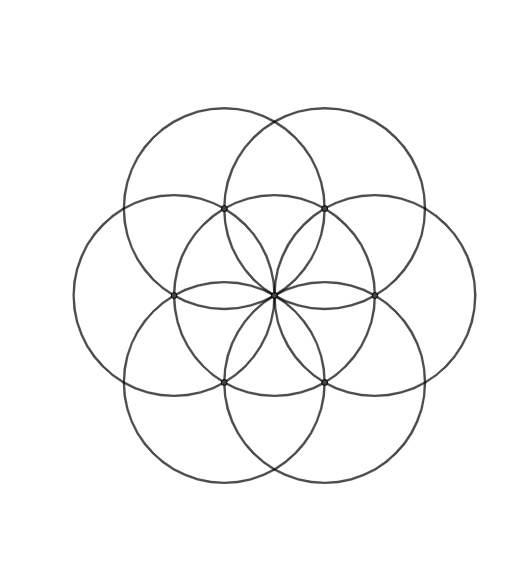
This example demonstrates how to construct sample spaces and solve geometric probability problems in GeoGebra. By drawing multiple circles and using the Intersect command to determine intersection points, the basic elements of the sample space are constructed. The core mathematical concepts involved include sample space, random events, and geometric probability calculation. Construction points: Use Circle command to draw circular objects, combine Intersect command to find intersection points (A, B, C, D, etc.), use sliders or variables to control the relative positions of circles, and observe changes in the sample space. This example is suitable for middle school mathematics probability and statistics chapters, as well as introductory probability courses in college preparatory mathematics.
GeoGebra Commands & Parameters
Intersect(xAxis, yAxis) → ACircle(A, B) → cCircle(B, Segment[A, B]) → dIntersect(d, c) → C, D, ,Circle(D, Segment[A, B]) → eCircle(C, Segment[A, B]) → fIntersect(e, c) → E, F, ,Intersect(f, c) → G, H, ,Circle(G, Segment[A, B]) → gCircle(F, Segment[A, B]) → hIntersect(h, g) → I, J, ,Circle(J, Segment[A, B]) → k
AI Drawing Prompt Reference
Start at the origin where the axes meet, draw a circle. Then, using a point on this circle as the center and the distance from the origin to that point as the radius, draw a second circle. The two circles intersect at two points. Using each of these intersection points as centers and the same radius, draw more circles that intersect the first circle, producing additional points. Continue this process: from each new intersection point, draw another circle with the same radius, intersecting the previous circle, to generate a pattern of equal-radius circles and intersection points, illustrating a sample space for geometric probability.
The prompt above was compiled from the original drawing commands and is for reference only.