
Ruled Surface in Tetrahedron
Loading the math board and drawing, please wait…
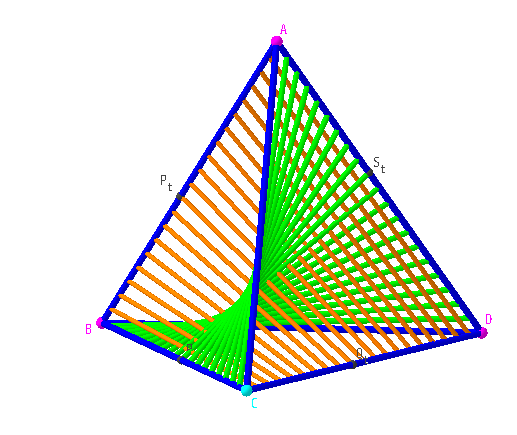
This example demonstrates the construction and visualization of a ruled surface within a tetrahedron. Key math concepts include solid geometry, vectors, parametric equations, and surface generation. The construction uses GeoGebra commands like Point, Tetrahedron, Segment, and objects such as f, g, C, B, a, D, A, faceABC, faceBCD, faceABD, faceACD, edgeBC, edgeAB, edgeAC, edgeBD, edgeCD, edgeAD, t, P_t, Q_t, b, s, R_t, S_t, c. Suitable for high school and above, ideal for teaching solid geometry and surface studies.
GeoGebra Commands & Parameters
Point(f) → CTetrahedron(B, C, xOyPlane) → a, D, edgeBD, edgeCD, edgeAD, A, faceABC, faceBCD, faceABD, faceACD, edgeBC, edgeAB, edgeACSegment(P_t, Q_t) → bSegment(R_t, S_t) → c
AI Drawing Prompt Reference
Visualize a ruled surface inside a tetrahedron, generated by connecting the tetrahedron's vertices to points on its faces, demonstrating vector, parametric equations, and surface generation. Start by constructing the tetrahedron, then create the generating lines for the surface.
The prompt above was compiled from the original drawing commands and is for reference only.