
Rotations in Algebraic Geometry
Loading the math board and drawing, please wait…
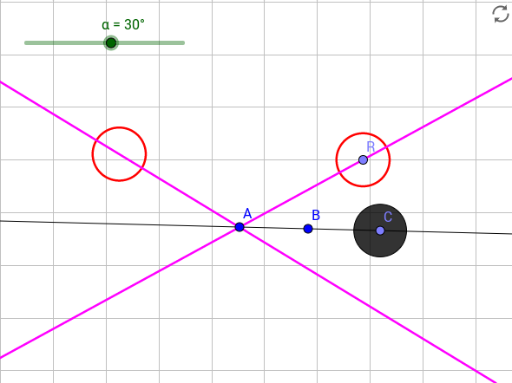
This example demonstrates how to construct geometric figures and their loci through rotation operations in algebraic geometry. Key math concepts include rotation, coordinate geometry, locus equation, and function graphing. It utilizes GeoGebra commands like Line, Point, Circle, Rotate, LocusEquation, involving objects such as α, B, A, f, C, c, D, C', a, g, R, b. Suitable for high school and above learners to understand the application of rotation transformations and locus construction in coordinate geometry.
GeoGebra Commands & Parameters
Line(A, B) → fPoint(f) → CCircle(C, 1) → cPoint(c) → DRotate(D, α, A) → C'LocusEquation(C', D) → aLine(A, C) → gRotate(C, α, A) → RLocusEquation(R, C) → b
AI Drawing Prompt Reference
Draw a line segment and its rotated locus to demonstrate rotation in coordinate geometry. Start by drawing a line segment, then find a point on it, draw a circle with this point as the center, and find a point on the circle. Rotate this point around the starting point of the line segment by an angle α to get a new point. Next, draw the locus equation of the new point, and draw the line connecting the original point to the new point. Finally, rotate the point on the original line segment by the same angle α around its starting point and draw its locus equation to show the effect of rotation transformation.
The prompt above was compiled from the original drawing commands and is for reference only.