
Rotational Symmetry of a Rectangle
Loading the math board and drawing, please wait…
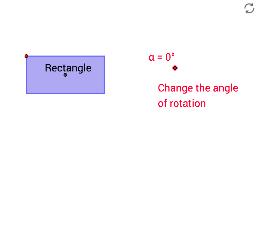
① This GeoGebra example dynamically demonstrates the rotational symmetry of a rectangle, showing that the shape coincides with itself after a 180° rotation about its center. ② Core mathematical concepts include rotational symmetry, central symmetry, geometric transformations, and properties of angles, segments, and polygons. ③ Construction highlights: using GeoGebra commands such as Segment, OrthogonalLine, Point, Intersect, Polygon, Circle, Line, Rotate, and Mirror, the rectangle and its rotated image are constructed, with rotation center, angle, and corresponding points labeled; sliders or dynamic manipulation allow interactive exploration. ④ Suitable for middle school geometry lessons or math enrichment, helping students grasp the definition and identification of rotational symmetry, and compare symmetry properties across different shapes.
GeoGebra Commands & Parameters
Segment(A, B) → aOrthogonalLine(A, a) → bOrthogonalLine(B, a) → cPoint(b) → COrthogonalLine(C, b) → dIntersect(c, d) → DPolygon(C, D, B, A) → poly1, c_1, d_1, b_1, a_1Segment(C, B) → eSegment(D, A) → fIntersect(e, f) → ESegment(K, L) → lCircle(K, L) → pPoint(p) → MSegment(K, M) → mLine(M, l) → nLine(L, m) → qIntersect(n, q) → NSegment(M, L) → rSegment(N, K) → sIntersect(r, s) → ORotate(C, (-α), E) → C'Rotate(D, (-α), E) → D'Rotate(B, (-α), E) → B'Rotate(A, (-α), E) → A'Polygon(C', D', B', A') → poly1', c', d', b', a'Rotate(M, (-α), O) → M'Rotate(N, (-α), O) → N'Rotate(L, (-α), O) → L'Rotate(K, (-α), O) → K'Polygon(M', N', L', K') → poly3', m', n', l', k'Segment(P, Q) → tSegment(P, R) → e_1Line(Q, e_1) → g_1Line(R, t) → h_1Intersect(g_1, h_1) → SSegment(R, Q) → i_1Segment(S, P) → j_1Intersect(i_1, j_1) → TRotate(P, (-α), T) → P'Rotate(R, (-α), T) → R'Rotate(S, (-α), T) → S'Rotate(Q, (-α), T) → Q'Segment(U, V) → t_1Line(W, t_1) → b_2Point(b_2) → ZSegment(W, V) → d_2Segment(Z, U) → e_2Intersect(d_2, e_2) → A_1Rotate(U, (-α), A_1) → U'Rotate(V, (-α), A_1) → V'Rotate(Z, (-α), A_1) → Z'Rotate(W, (-α), A_1) → W'Line(B_1, C_1) → f_2Mirror(D_1, f_2) → E_1Segment(D_1, E_1) → g_2Intersect(f_2, g_2) → F_1Rotate(D_1, (-α), F_1) → G_1Rotate(B_1, (-α), F_1) → H_1Rotate(E_1, (-α), F_1) → I_1Rotate(C_1, (-α), F_1) → J_1Polygon(G_1, H_1, I_1, J_1) → poly6', g_3, h_2, i_2, j_2Intersect(c', a') → HIntersect(c_1, a_1) → I
AI Drawing Prompt Reference
Draw a rectangle and rotate it 180 degrees about its center, showing the rotated image coincides with the original. Inside the rectangle, draw two diagonals intersecting at the center. Additionally, construct an arbitrary triangle outside the rectanglehol and rotate it 180 degrees about the midpoint of one of its sides. Then construct an arbitrary quadrilateral and rotate it 180 degrees about the intersection of its diagonals. All rotations are 180 degrees, demonstrating central symmetry.
The prompt above was compiled from the original drawing commands and is for reference only.