
Rotational Symmetry by CRDO
Loading the math board and drawing, please wait…
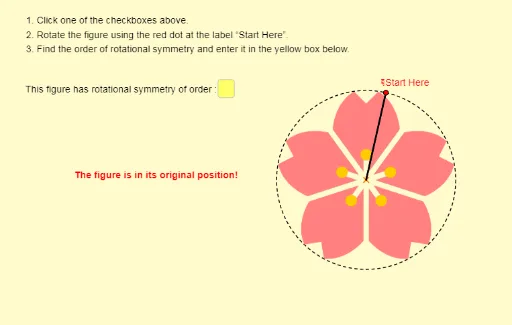
This example demonstrates rotational symmetry. Key mathematical concepts include rotational symmetry and complex numbers. Using GeoGebra commands such as Sequence, Circle, and Point, the example constructs figures with rotational symmetry. Suitable for middle school and above students to learn geometric transformations.
GeoGebra Commands & Parameters
Sequence(Rotate[A, i°], i, 1, 360) → list1Circle(O, A) → kPoint(list1) → BAngle(B, O, A) → αSegment(O, A) → jSegment(O, B) → lIf(e ∨ h, 180°, If[i, 90°, If[a, 72°, If[m ∨ p, 120°, If[n, 45°, If[c, 60°, 0°]]]]]) → matchAngleTextfield(UserInput) → InputBox1Rotate(pic10, (-α), O) → pic10'Rotate(pic12, (-α), O) → pic12'Rotate(pic1, (-α), O) → pic1'Rotate(pic2, (-α), O) → pic2'Rotate(pic5, (-α), O) → pic5'Rotate(pic7, (-α), O) → pic7'Rotate(pic9, (-α), O) → pic9'Rotate(pic8, (-α), O) → pic8'Element(list2, 1) → AnswerRotate(pic4, (-α), O) → pic4'Rotate(pic6, (-α), O) → pic6'Rotate(pic11, (-α), O) → pic11'Rotate(pic3, (-α), O) → pic3'
AI Drawing Prompt Reference
Draw a figure demonstrating rotational symmetry. Start with a center point and an initial point, then draw a circle centered at the center passing through the initial point. Rotate the initial point around the center in 1-degree increments for a full 360 degrees, generating a set of points evenly spaced on the circle. Select one of these points as the current point, and draw line segments from the center to the initial point and from the center to the current point, marking the angle between them. Include several image elements that rotate together with the current point to show the symmetry effect. The overall composition emphasizes rotational symmetry and angle relationships, suitable for middle school geometry learning.
The prompt above was compiled from the original drawing commands and is for reference only.