
Rotation Transformation by Gabe Thomas
Loading the math board and drawing, please wait…
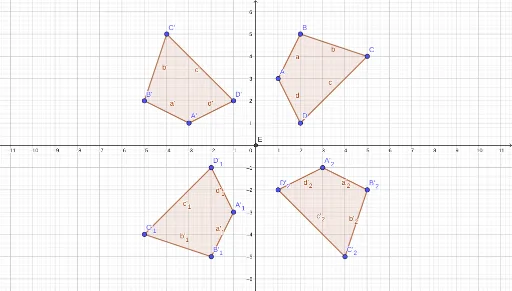
This example demonstrates how to perform rotation transformations using GeoGebra. It involves the concept of rotation in geometry, using commands like Polygon, Intersect, and Rotate to observe the changes in points and shapes at different angles. Suitable for students at junior high school level and above to learn about geometric transformations and shape transformations.
GeoGebra Commands & Parameters
Polygon(A, B, C, D) → q1, a, b, c, dIntersect(xAxis, yAxis) → ERotate(A, 90°, E) → A'Rotate(B, 90°, E) → B'Rotate(C, 90°, E) → C'Rotate(D, 90°, E) → D'Polygon(A', B', C', D') → q1', a', b', c', d'Rotate(A, 180°, E) → A'_1Rotate(B, 180°, E) → B'_1Rotate(C, 180°, E) → C'_1Rotate(D, 180°, E) → D'_1Polygon(A'_1, B'_1, C'_1, D'_1) → q1'_1, a'_1, b'_1, c'_1, d'_1Rotate(A, 270°, E) → A'_2Rotate(B, 270°, E) → B'_2Rotate(C, 270°, E) → C'_2Rotate(D, 270°, E) → D'_2Polygon(A'_2, B'_2, C'_2, D'_2) → q1'_2, a'_2, b'_2, c'_2, d'_2