
Rotation Pattern
Loading the math board and drawing, please wait…
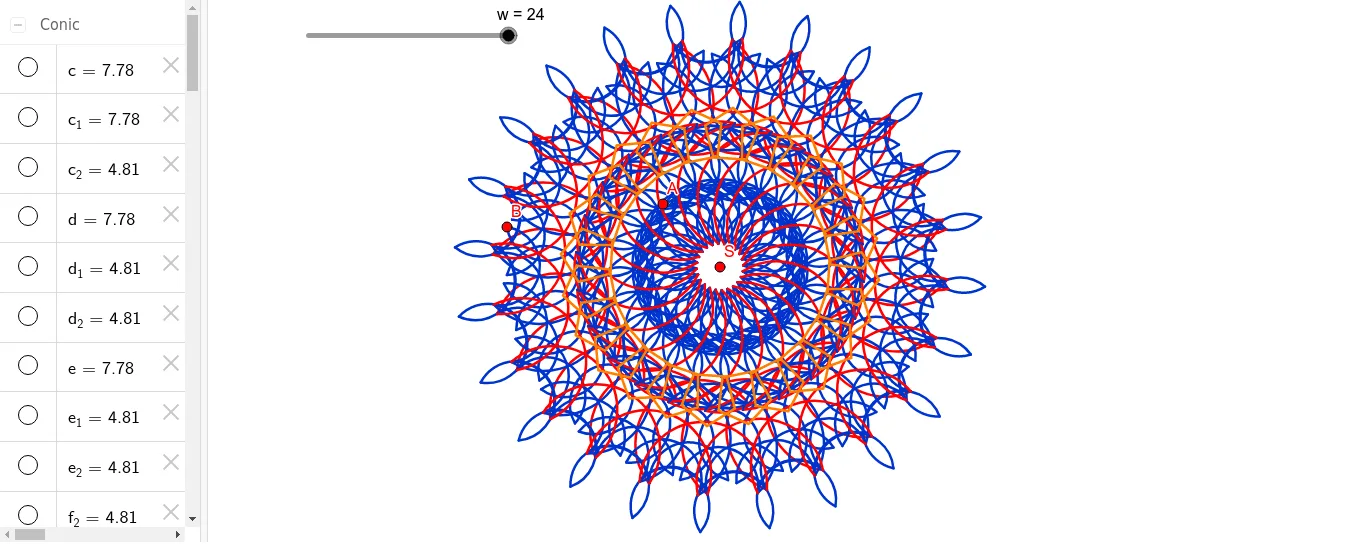
This example demonstrates the creation of complex patterns through rotation and geometric constructions. It involves core mathematical concepts like rotation, polygon construction, function graphs, and solid geometry. Key GeoGebra commands and objects used include Polygon, Midpoint, Semicircle, and Sequence. Suitable for high school mathematics teaching and geometric construction learning.
GeoGebra Commands & Parameters
Polygon(A, B, 5) → poly1, f, g, h, i, j, C, D, EMidpoint(E, A) → FMidpoint(A, B) → GMidpoint(B, C) → HMidpoint(C, D) → IMidpoint(D, E) → JSemicircle(J, I) → cSemicircle(I, H) → dSemicircle(H, G) → eSemicircle(G, F) → kSemicircle(F, J) → pSemicircle(J, F) → qSemicircle(F, G) → rSemicircle(G, H) → sSemicircle(H, I) → tSemicircle(I, J) → c_1Polygon(A, B, 3) → poly2, l, m, n, KPolygon(B, C, 3) → poly3, a, b, f_1, LPolygon(C, D, 3) → poly4, g_1, h_1, i_1, MPolygon(D, E, 3) → poly5, j_1, k_1, l_1, NPolygon(E, A, 3) → poly6, m_1, n_1, p_1, OPolygon(M, N, 5) → poly7, q_1, r_1, s_1, t_1, a_1, P, Q, RSemicircle(F, A) → d_1Semicircle(B, H) → e_1Semicircle(H, C) → c_2Semicircle(C, I) → d_2Semicircle(I, D) → e_2Semicircle(D, J) → f_2Semicircle(J, E) → g_2Semicircle(E, F) → h_2Semicircle(A, G) → k_2Semicircle(G, B) → p_2Sequence(Rotate[c, ((i * 2) * π / w), S], i, 1, w) → L_1Sequence(Rotate[c_1, ((i * 2) * π / w), S], i, 1, w) → L_2Sequence(Rotate[c_2, ((i * 2) * π / w), S], i, 1, w) → L_3Sequence(Rotate[d_2, ((i * 2) * π / w), S], i, 1, w) → L_4Sequence(Rotate[d_1, ((i * 2) * π / w), S], i, 1, w) → L_5Sequence(Rotate[d, ((i * 2) * π / w), S], i, 1, w) → L_6Sequence(Rotate[e, ((i * 2) * π / w), S], i, 1, w) → L_7Sequence(Rotate[e_1, ((i * 2) * π / w), S], i, 1, w) → L_8Sequence(Rotate[e_2, ((i * 2) * π / w), S], i, 1, w) → L_9Sequence(Rotate[f_2, ((i * 2) * π / w), S], i, 1, w) → L_{10}Sequence(Rotate[g_2, ((i * 2) * π / w), S], i, 1, w) → L_{11}Sequence(Rotate[h_2, ((i * 2) * π / w), S], i, 1, w) → L_{12}Sequence(Rotate[k_2, ((i * 2) * π / w), S], i, 1, w) → L_{13}Sequence(Rotate[p_2, ((i * 2) * π / w), S], i, 1, w) → L_{14}Sequence(Rotate[p, ((i * 2) * π / w), S], i, 1, w) → L_{15}Sequence(Rotate[k, ((i * 2) * π / w), S], i, 1, w) → L_{16}Sequence(Rotate[q, ((i * 2) * π / w), S], i, 1, w) → L_{17}Sequence(Rotate[r, ((i * 2) * π / w), S], i, 1, w) → L_{18}Sequence(Rotate[s, ((i * 2) * π / w), S], i, 1, w) → L_{19}Sequence(Rotate[t, ((i * 2) * π / w), S], i, 1, w) → L_{20}Sequence(Rotate[poly7, ((i * 2) * π / w), S], i, 1, w) → L_{21}
AI Drawing Prompt Reference
Draw a regular pentagon with five points A, B, C, D, and E. Then, find the midpoints of each pair of points and connect them to form a new regular pentagon. Next, draw semicircles with each midpoint as the center and the distance from the midpoint to the original pentagon vertex as the radius. Finally, rotate these semicircles around each midpoint to create a complex rotation pattern.
The prompt above was compiled from the original drawing commands and is for reference only.