
Rotation Demonstration by Terry Lee Lindenmuth
Loading the math board and drawing, please wait…
In collections
IMP2GBD
Geometry Transformation
Maths for 8th Grade Units 1 to 3
Learn with Lindy: Transformations Intro
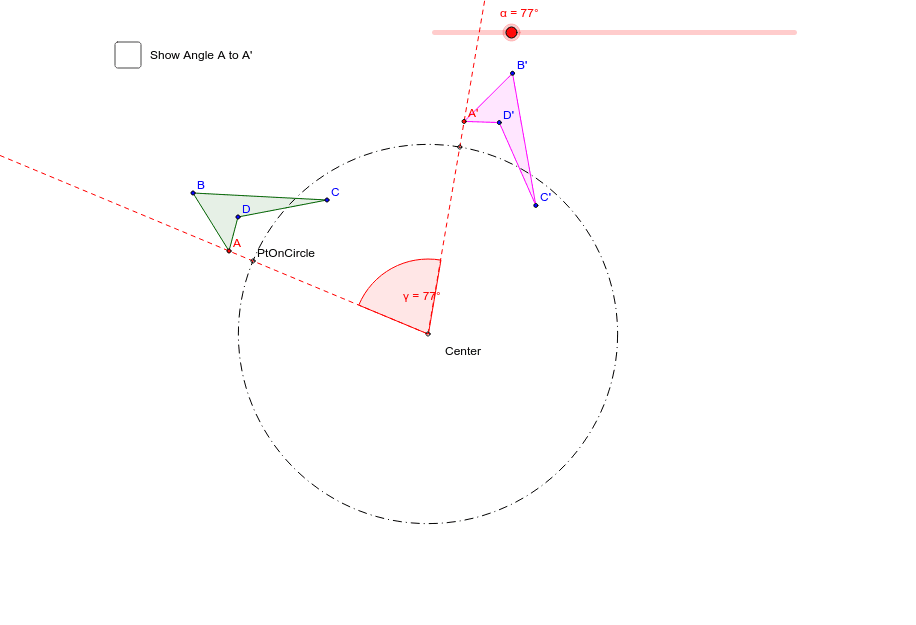
This example is used to explore and demonstrate rotations. Key mathematical concepts include rotation, similar triangles, and trigonometry. Using GeoGebra commands such as Polygon, Circle, Rotate, Segment, and Angle, you can construct rotated figures. Suitable for students in middle school and above learning geometric transformations.
GeoGebra Commands & Parameters
Polygon(A, B, C, D) → poly1, a, b, c, dCircle(Center, PtOnCircle) → eRotate(A, (-α), Center) → A'Rotate(B, (-α), Center) → B'Rotate(C, (-α), Center) → C'Rotate(D, (-α), Center) → D'Polygon(A', B', C', D') → poly1', a', b', c', d'Segment(Center, A) → fSegment(Center, A') → gAngle(A', Center, A) → βSegment(PtOnCircle, Center) → hRotate(PtOnCircle, (-α), Center) → PtOnCircle'Angle(PtOnCircle', Center, PtOnCircle) → γRay(Center, PtOnCircle) → iRay(Center, PtOnCircle') → j
AI Drawing Prompt Reference
Draw a quadrilateral ABCD, then rotate it -45 degrees around a center point to form a new quadrilateral A'B'C'D'. Next, draw a line segment from one vertex of quadrilateral ABCD to the center point, and the corresponding line segment from the rotated vertex A' to the center point, and measure the angle β formed by these two line segments. Finally, draw a line segment from the center point to one vertex of quadrilateral ABCD, rotate it -45 degrees to form a new line segment PtOnCircle', and measure the angle γ formed by these two line segments.
The prompt above was compiled from the original drawing commands and is for reference only.