
Rotation and Equilateral Triangle
Loading the math board and drawing, please wait…
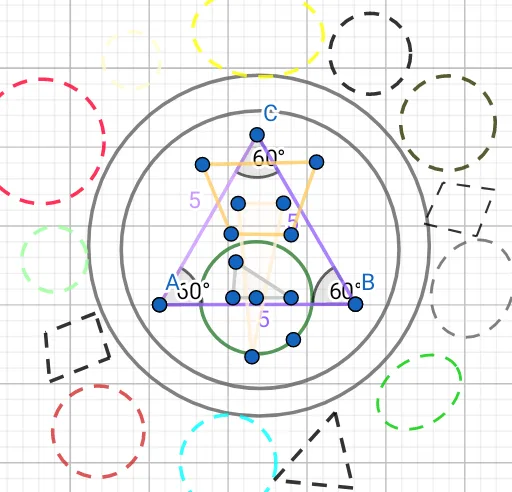
This example demonstrates the rotation of an equilateral triangle and its related properties. Key mathematical concepts include angles, rotation, equilateral triangles, and functions. Using GeoGebra commands such as Rotate, Polygon, and Angle, a dynamic model of the rotating equilateral triangle can be constructed. Suitable for middle school and above students to learn geometric transformations and function graphs.
GeoGebra Commands & Parameters
Rotate(A, β, B) → CAngle(C, B, A) → δRotate(C, ζ, A) → A''Angle(A'', A, C) → ηRotate(B, θ, C) → B'Angle(B', C, B) → ιSegment(C, A) → fSegment(A, B) → gSegment(C, B) → hSegment(A, B') → iPolygon(G, H, I) → t1, i_1, g_1, h_1Polygon(J, K, L) → t2, l, j, kSegment(M, D) → mSegment(D, E) → nSegment(E, F) → pSegment(F, M) → qPoint(k) → NCircle(N, O) → cSegment(P, Q) → rCircle(R, 3.5206630456888095) → dCircle(V, 4.318008404361196) → sEllipse(W, Z, A_1) → eCircle(B_1, 1.1986867356097015) → tCircle(C_1, 1.157712222355001) → c_1Circle(D_1, 1.5782890280556081) → d_1Circle(E_1, 1.0245749186240654) → e_1Ellipse(F_1, G_1, H_1) → f_1Circle(I_1, 0.7286722651827102) → k_1Ellipse(M_1, N_1, O_1) → q_1Circle(V_1, 0.8290493702679644) → t_1Circle(W_1, 1.2121144859053594) → c_2Polygon(C_2, D_2, E_2) → t3, e_2, a, d_2Polygon(F_2, G_2, H_2, I_2) → q1, f_2, g_2, h_2, i_2Polygon(J_2, K_2, L_2, M_2) → q2, j_2, k_2, l_2, m_2
AI Drawing Prompt Reference
Draw an equilateral triangle and show its rotation around a vertex. Start with the initial triangle, then rotate each vertex sequentially to form multiple rotated triangles, marking the rotation angles. Connect corresponding vertices before and after rotation with auxiliary segments. Add several circles, ellipses, and auxiliary polygons around the figure to illustrate rotational symmetry and geometric relationships. The overall composition includes multiple triangles, circles, ellipses, and segments, emphasizing angle changes and visual effects of transformation.
The prompt above was compiled from the original drawing commands and is for reference only.