
Rotating Spotlight on Stage Edge Illumination Ratio
Loading the math board and drawing, please wait…
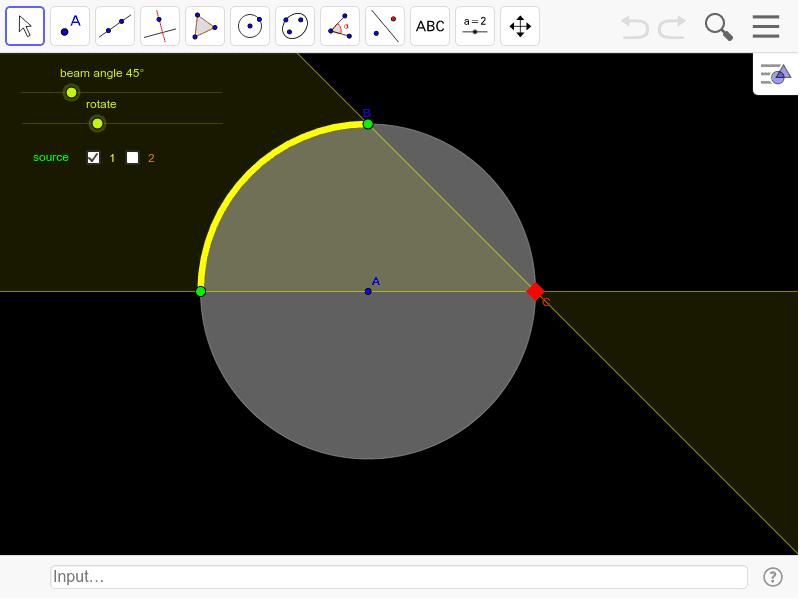
This example demonstrates the proportion of the dark circular edge of a stage that is lit up by a rotating spotlight on its rim. It involves core math concepts like angles, circles, rotation, statistical characteristics, and rational numbers. The construction uses GeoGebra commands: Circle, Point, Rotate, Line, Intersect, CircleSector, and CircleArc. It is suitable for middle school and above students to learn geometric constructions and probability & statistics, focusing on rotation and area ratio relationships.
GeoGebra Commands & Parameters
Circle(A, B) → cPoint(c) → CCircle(C, 30) → dPoint(d) → HRotate(H, β, C) → H'Line(H', C) → aRotate(a, α, C) → a'Intersect(d, a', 1) → DIntersect(d, a, 2) → EIntersect(d, a', 2) → FCircleSector(C, H', D) → eCircleSector(C, E, F) → fIntersect(c, a, 2) → GRotate(G, (2 * α), A) → G'CircleArc(A, G, G') → gCircleArc(A, G', G) → hCircleSector(C, D, E) → kCircleSector(C, F, H') → p
AI Drawing Prompt Reference
Draw a circle c, then take a point C on it, draw another circle d with C as the center and a radius of 30, take a point H on d, rotate H around C, then draw a line a through H and C, rotate a around C to get a', find the intersection points D, E, and F of a', a, and d, draw two sectors e and f with H' and D as the starting points and E and F as the endpoints, find the intersection point G of a and c, rotate G around C to get G', draw two arcs g and h with A as the starting point and G and G' as the endpoints, and finally draw two sectors k and p.
The prompt above was compiled from the original drawing commands and is for reference only.