
Rotating a Rectangle: 3D Solid Geometry Demonstration
Loading the math board and drawing, please wait…
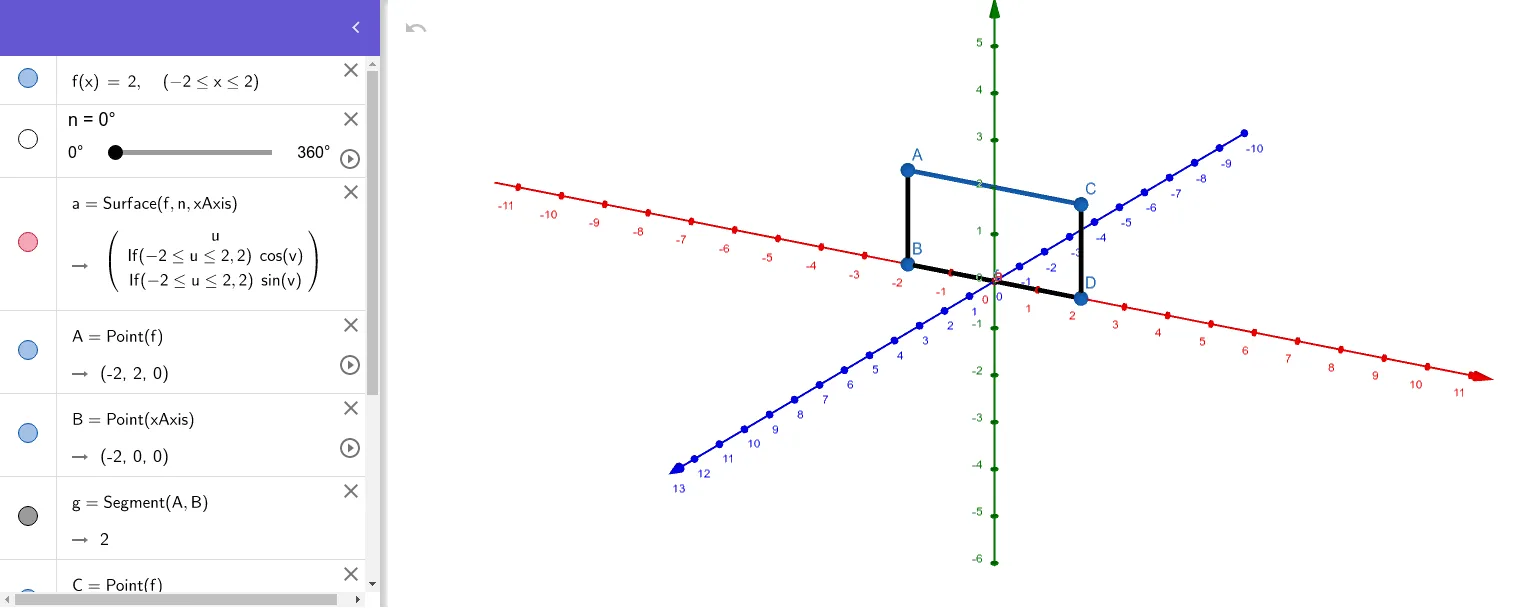
① This example demonstrates how a rectangle rotates in 3D space to generate solids like cylinders or prisms, visualizing the geometric phenomenon of a plane figure sweeping out a volume. ② Core math concepts include 3D rotation, solid geometry (cylinders, prisms), volume and surface area relationships, and transformations of polygons in space. ③ Construction highlights: using GeoGebra's Surface command to create the rotating surface, Point and Segment commands to define the rectangle's vertices and edges, with objects f, n, a, A, B, g, C, D, h, i; adjusting the rotation angle or axis reveals the evolving solid shape. ④ Suitable for upper secondary or early university students learning solid geometry, spatial reasoning, and dynamic geometry, as well as for teachers demonstrating the generation of solids of revolution in class.
GeoGebra Commands & Parameters
Surface(f, n, xAxis) → aPoint(f) → APoint(xAxis) → BSegment(A, B) → gPoint(f) → CPoint(xAxis) → DSegment(C, D) → hSegment(D, B) → i
AI Drawing Prompt Reference
Draw a rectangle in 3D space that rotates around a horizontal axis, sweeping out a solid shape like a cylinder or prism. The rectangle has two parallel edges, one on the axis and one on the rectangle, connected by two other edges. Place two points on the rectangle and two points on the axis, then connect them with line segments to form the rectangle's four sides. Include a rotation angle slider; as it changes, the rectangle rotates about the axis, dynamically showing how the plane figure generates a volume.
The prompt above was compiled from the original drawing commands and is for reference only.