
Rotate Quadrilateral
Loading the math board and drawing, please wait…
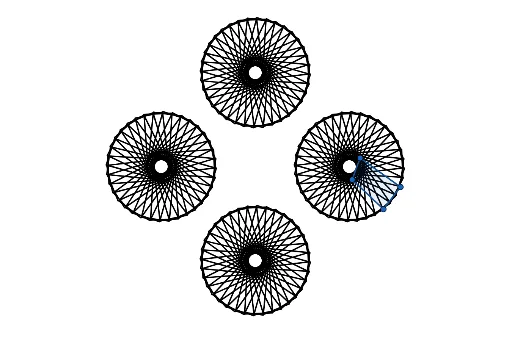
This example demonstrates how to construct a quadrilateral through rotation. Key mathematical concepts include rotation, polygons, and angles. It utilizes GeoGebra commands such as Point, Polygon, Zip, Intersect, and Rotate. Suitable for middle school and above students to learn geometric transformations.
GeoGebra Commands & Parameters
Point(xAxis) → APolygon(B, C, D, E) → q1, b, c, d, eZip(Polygon[Rotate[B, a°, A], Rotate[C, a°, A], Rotate[D, a°, A], Rotate[E, a°, A]], a, list1) → L_1Intersect(xAxis, yAxis) → FRotate(L_1, 90°, F) → L_2Rotate(L_2, 90°, F) → L_3Rotate(L_3, 90°, F) → L_4
AI Drawing Prompt Reference
On a coordinate plane, draw an arbitrary quadrilateral with its vertices near the axes. Then, using the origin as the pivot, rotate this quadrilateral by a sequence of increasing angles to create multiple copies radiating around the origin. Next, take the entire set of these rotated quadrilaterals and rotate it three times by 90 degrees around the intersection point of the axes, producing four symmetric groups of quadrilaterals arranged in a rotational pattern around the center.
The prompt above was compiled from the original drawing commands and is for reference only.