
Rolling Coin Problem: Rotation Angle and Expected Value of a Circle Rolling Alon
Loading the math board and drawing, please wait…
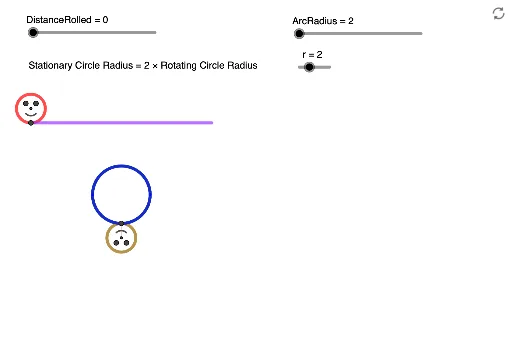
① This example demonstrates a coin (red circle) rolling without slipping along an arc-shaped track, showing how its own rotation angle relates to the rolled distance, and explores the expected rotation angle under random rolling. ② Core mathematical concepts include rolling of circles, relation between rotation angle and arc length, inscribed and central angles, cosine law, expected value, and angle relations in general quadrilaterals. ③ Construction highlights: using GeoGebra commands such as Rotate, OrthogonalLine, Angle, Intersect, Circle, Line, Segment, If, Point, CircleArc, the construction includes red, green, and brown circles, an arc track, center lines, perpendiculars, intersection points, points on arcs, semicircles, and dynamic sliders to control rolling distance, with angles α, β, δ, ε, η displayed. ④ Suitable for high school or early college students learning geometry of rolling circles, rotation and angle measurement, and probability expectation in geometric contexts, also useful for mathematical modeling and inquiry-based learning.
GeoGebra Commands & Parameters
Rotate(ArcMiddle, (-ArcAngle), ArcCentre) → ArcRightRotate(ArcMiddle, ArcAngle, ArcCentre) → ArcLeftOrthogonalLine(RedCentre, xAxis) → VLineThruRedCentreRotate(PointOnStraight, (-DistanceRolled), RedCentre) → RedEdgePointAngle(RedEdgePoint, RedCentre, PointOnStraight) → αOrthogonalLine(GreenCentre, xAxis) → VLineThruGreenCentreIntersect(GreenCircle, VLineThruGreenCentre, 1) → ARotate(A, ((-DistanceRolled)) / r, GreenCentre) → A'Angle(A', GreenCentre, A) → βCircle(A', 1) → eIntersect(Arc, VLineThruGreenCentre, (6.283185307179586, -3)) → DAngle(ArcMiddle, ArcCentre, ArcLeft) → δAngle(ArcRight, ArcCentre, ArcMiddle) → εRotate(ArcLeft, (-(Mod[DistanceRolled, ((2 * π) * r)] / ArcRadius)), ArcCentre) → PointOnArcAngle(PointOnArc, ArcCentre, ArcLeft) → ζLine(PointOnArc, ArcCentre) → LineArcCentreBrownCircleCircle(PointOnArc, 1) → cIntersect(c, LineArcCentreBrownCircle, 1) → BrownCentreCircle(BrownCentre, 1) → BrownCircleRotate(PointOnArc, (-DistanceRolled), BrownCentre) → BrownEdgePointAngle(BrownEdgePoint, BrownCentre, PointOnArc) → ηLine(ArcCentre, xAxis) → HLineThruArcCentreSegment(BrownCentre, BrownEdgePoint) → BrownCircleLineIf(DistanceRolled ≥ ((2 * π) * r), DistanceRolled - ((2 * π) * r), DistanceRolled) → DistanceModRotate(RedEdgePoint, 135°, RedCentre) → RedEdgePoint'Angle(RedEdgePoint, RedCentre, RedEdgePoint') → γCircle(RedCentre, 0.5) → RedInnerCircleRotate(RedEdgePoint, 135°, RedCentre) → RedEdgePoint'_1Angle(RedEdgePoint, RedCentre, RedEdgePoint'_1) → θRotate(RedEdgePoint, (-(135°)), RedCentre) → RedEdgePoint'_2Angle(RedEdgePoint'_2, RedCentre, RedEdgePoint) → ιRotate(RedEdgePoint, 45°, RedCentre) → RedEdgePoint'_3Angle(RedEdgePoint, RedCentre, RedEdgePoint'_3) → κLine(RedCentre, RedEdgePoint'_3) → hOrthogonalLine(RedCentre, h) → jIntersect(RedInnerCircle, h, 1) → RedCircleLeftEyeIntersect(RedInnerCircle, j, 2) → RedCircleRightEyeIntersect(RedInnerCircle, j, 1) → RedCircleSmileLeftPoint(h) → RedCircleSmileRightCircleArc(RedCentre, RedCircleSmileLeft, RedCircleSmileRight) → RedCircleSmileSegment(RedEdgePoint, RedCentre) → RedCircleLineRotate(BrownEdgePoint, 45°, BrownCentre) → BrownEdgePoint'Angle(BrownEdgePoint, BrownCentre, BrownEdgePoint') → λLine(BrownEdgePoint', BrownCentre) → kOrthogonalLine(BrownCentre, k) → lCircle(BrownCentre, 0.5) → BrownInnerCircleIntersect(BrownInnerCircle, k, 2) → BrownCircleLeftEyeIntersect(BrownInnerCircle, l, 1) → BrownCircleRightEyeIntersect(BrownInnerCircle, l, 2) → BrownCircleSmileLeftPoint(k) → BrownCircleSmileRightCircleArc(BrownCentre, BrownCircleSmileLeft, BrownCircleSmileRight) → BrownCircleSmile
AI Drawing Prompt Reference
Draw a red circle rolling without slipping along an arc-shaped track to show the relation between its rotation angle and rolled distance, exploring the expected rotation angle under random rolling. Include red, green, and brown circles, an arc track, center lines, perpendiculars, intersection points, points on arcs, semicircles, and dynamic sliders for rolling distance control. Display angles α, β, δ, ε, η, using rotations, perpendiculars, intersections, and other geometric transformations.
The prompt above was compiled from the original drawing commands and is for reference only.