
Right Triangle Trig Practice-Finding Acute Angles
Loading the math board and drawing, please wait…
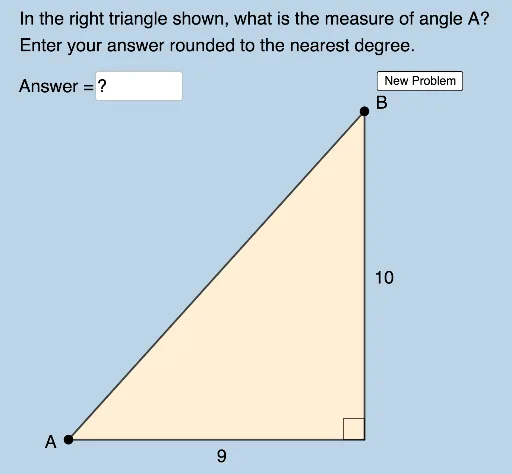
This example demonstrates how to measure acute angles within right triangles using trigonometric functions. It involves core concepts like angles, cosine, sine, trigonometry, circumcircle, area, scatter plot, and ratios. Constructed using GeoGebra commands such as Random, Polygon, Circle, Intersect, Segment, Angle, Element, and Textfield. Ideal for high school mathematics education and self-learning to understand and apply trigonometric principles.
GeoGebra Commands & Parameters
Random(2, 9) → aRandom(2, 10) → bRandom(a + 1, 10) → cPolygon(A, B_1, C) → t1, c_1, a_1, b_1Circle(A, c) → dIntersect(d, f, 1) → BPolygon(A, B_1, B) → t2, d_1, a_2, b_2Segment(A, B_1) → gSegment(B_1, B) → hSegment(B, A) → iSegment(C, B_1) → jSegment(C, A) → kAngle(B, B_1, A) → αRandom(1, 2) → mAngle(B_1, A, C) → βRandom(1, 2) → nElement(L1, n) → text1Element(L2, n) → text2Angle(B_1, A, B) → γTextfield(δ) → InputBox1Angle(A, C, B_1) → ηAngle(A, B, B_1) → θ