
Right Triangle Prism
Loading the math board and drawing, please wait…
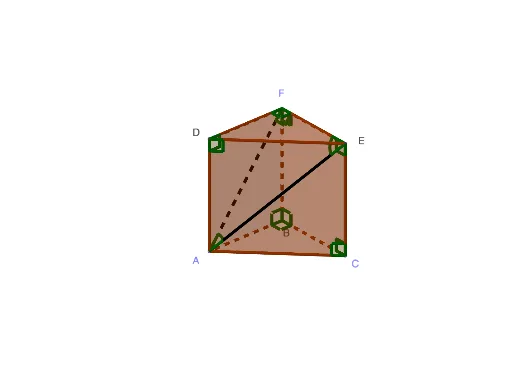
This example demonstrates the geometric construction and properties of a right triangle prism. It involves core mathematical concepts such as solid geometry, triangles, prisms, equations, function graphs, and inequalities. The construction uses GeoGebra commands like Point, Intersect, Segment, Prism, and Angle to build points, lines, faces, and the prism model. It is suitable for high school geometry teaching and learning, helping students understand prism volume, surface area, and spatial geometric relationships.
GeoGebra Commands & Parameters
Point(xAxis) → AIntersect(zAxis, xAxis) → BSegment(A, B) → fPoint(yAxis) → CSegment(C, B) → gSegment(A, C) → hPoint(zAxis) → FPrism(B, A, C, F) → a, D, edgeBC, edgeBF, edgeAD, edgeCE, edgeDF, edgeDE, edgeEF, E, faceABC, faceABFD, faceACED, faceBCEF, faceDEF, edgeAB, edgeACSegment(E, A) → iSegment(F, A) → jAngle(E, F, A) → αAngle(A, B, F) → βAngle(A, D, F) → γAngle(F, A, E) → δAngle(A, E, F) → εAngle(C, B, F) → ζAngle(B, C, E) → ηAngle(D, F, E) → θAngle(B, F, E) → ιAngle(F, E, C) → κAngle(C, B, A) → λAngle(E, D, A) → μAngle(E, C, A) → ν
AI Drawing Prompt Reference
Draw a right triangular prism with a right triangle base ABC and a top right triangle DEF, connected by the edges. Start by drawing point A on the x-axis, point C on the y-axis, and point F on the z-axis. Then construct the prism using points A, B, C, and F. Next, draw the edges of the base triangle ABC (AB, AC, BC) and the top triangle DEF (DE, DF, EF). Finally, measure and display angles such as ∠EAF, ∠BFA, etc.
The prompt above was compiled from the original drawing commands and is for reference only.