
Right Circular Cylinder Construction
Loading the math board and drawing, please wait…
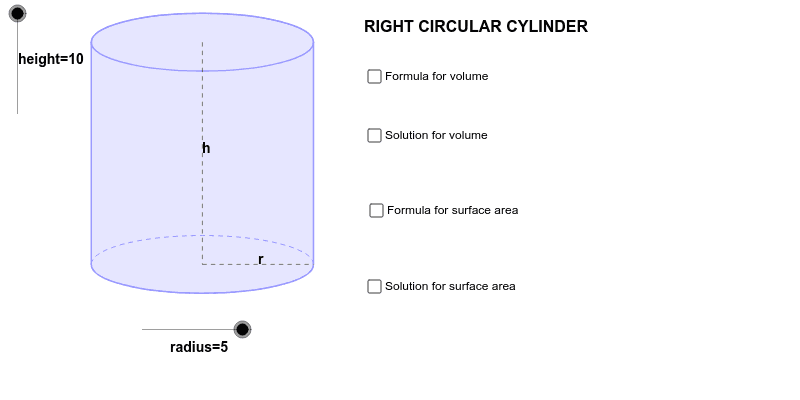
This example demonstrates the construction of a right circular cylinder and its related elements using GeoGebra. Key math concepts include solid geometry, vectors, circles, polygons, and transformations. The construction involves commands like Dilate, Vector, Translate, Arc, Polygon, Segment, and Midpoint, as well as objects such as radius, height, and vectors. It is suitable for high school geometry education and understanding spatial figures.
GeoGebra Commands & Parameters
Dilate(B, height, A) → CVector(A, C) → uTranslate(c, u) → dTranslate(R, u) → DTranslate(P, u) → ETranslate(L, u) → FArc(d, 0, 3.141592653589793) → eArc(c, 3.141592653589793, 0) → fPolygon(F, D, R, L) → Q, f_1, d_1, r_1, lSegment(E, P) → aSegment(P, R) → bMidpoint(E, P) → GMidpoint(P, R) → H
AI Drawing Prompt Reference
Draw a right circular cylinder with its base circle, side surface, height, and radius. Start by defining the center A and radius r, then construct circle B through A and height h. Next, construct vector u through points B and A, and use u to translate circle B and point P to get circle D and point E. Then, translate line segment L and P to get line segment F and G. Construct arcs e and f on line segments d and c, respectively, using circle B. Use line segments d, c, F, D, R, and L to construct polygon Q. Finally, construct line segments E to P and P to R to get line segments a and b, and points G and H as the midpoints of line segments E to P and P to R.
The prompt above was compiled from the original drawing commands and is for reference only.