
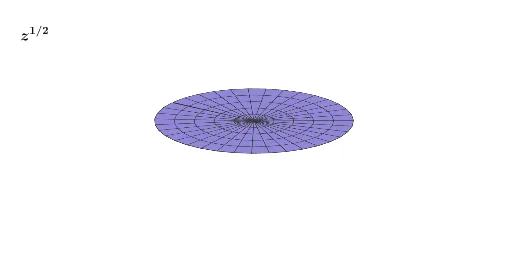
Riemann Surface: z^(1/2)
Loading the math board and drawing, please wait…
This example demonstrates the Riemann surface of the complex power function z^(1/2), highlighting its multivalued nature and branch structure. Key mathematical concepts include complex numbers, power functions, Riemann surfaces, multivalued functions, and branch cuts. The construction utilizes GeoGebra's Surface command along with objects like button1, t, Re1, Im1, HRe1, HIm1, Re2, Im2, HRe2, HIm2, RSRe, RSIm, RSReN, RSImN, a, b, c, and text1 for parameterization and display. It is suitable for university-level mathematics and complex analysis courses to illustrate the geometric interpretation of abstract complex functions.
GeoGebra Commands & Parameters
Surface((u * cos(v)), (u * sin(v)), HRe1((u * cos(v)), (u * sin(v))), u, 0, 2, v, (-π), π - π / 200) → RSReSurface((u * cos(v)), (u * sin(v)), HIm1((u * cos(v)), (u * sin(v))), u, 0, 2, v, (-π), π - π / 200) → RSImSurface((u * cos(v)), (u * sin(v)), HRe2((u * cos(v)), (u * sin(v))), u, 0, 2, v, (-π), π - π / 200) → RSReNSurface((u * cos(v)), (u * sin(v)), HIm2((u * cos(v)), (u * sin(v))), u, 0, 2, v, (-π), π - π / 200) → RSImN
AI Drawing Prompt Reference
Draw the Riemann surface of the complex power function z^(1/2), highlighting its multivalued nature and branch structure, including two surfaces for real and imaginary parts, with parameters u ranging from 0 to 2 and v from -π to π - π/200, real parts calculated by HRe1 and HRe2, imaginary parts by HIm1 and HIm2, forming a complete Riemann surface structure.
The prompt above was compiled from the original drawing commands and is for reference only.