
Rhombus Template by Dan Dale
Loading the math board and drawing, please wait…
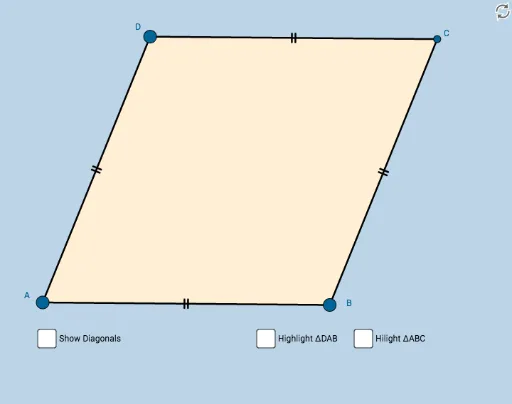
This applet demonstrates a rhombus and helps students discover its properties through interactive exploration. Key mathematical concepts include the definition and geometric properties of a rhombus. Using GeoGebra commands such as Circle, Point, Intersect, Segment, Midpoint, Angle, and Polygon, the rhombus can be dynamically constructed and explored. Suitable for students in middle school and above.
GeoGebra Commands & Parameters
Circle(A, B) → cPoint(c) → DCircle(B, A) → dCircle(D, A) → eIntersect(d, e, 2) → CSegment(A, B) → aSegment(B, C) → bSegment(C, D) → fSegment(D, A) → gMidpoint(A, C) → ESegment(D, E) → hSegment(E, B) → iSegment(C, E) → jSegment(E, A) → kAngle(D, C, E) → αAngle(E, C, B) → βAngle(B, A, E) → γAngle(E, A, D) → δAngle(C, B, E) → εAngle(E, B, A) → ζAngle(E, D, C) → ηAngle(A, D, E) → θAngle(C, E, D) → ιPolygon(A, B, C) → poly1, c_1, a_1, b_1Mirror(A, k) → A'Mirror(B, k) → B'Mirror(C, k) → C'Polygon(A', B', C') → poly1', c', a', b'Polygon(D, A, B) → poly2, b_2, d_1, a_2Mirror(D, h) → D'Mirror(A, h) → A'_1Mirror(B, h) → B'_1Polygon(D', A'_1, B'_1) → poly2', b'_1, d', a'_1Polygon(A, B, C, D) → poly3, a_3, b_3, c_2, d_2Segment(D, B) → sSegment(A, C) → t
AI Drawing Prompt Reference
Draw a rhombus by first creating a circle with center A and passing through B, then creating another circle with center B and passing through A, and finding their intersection point C. Connect points A to B, B to C, C to D, and D to A to form the rhombus. Then find the midpoint E of AC, and draw segments DE, EB, EC, and EA to form the diagonals of the rhombus. Finally, mirror the vertices and sides of the rhombus to create its mirror image.
The prompt above was compiled from the original drawing commands and is for reference only.