
Rhombus Project: Dynamic Geometry with Circles and Lines
Loading the math board and drawing, please wait…
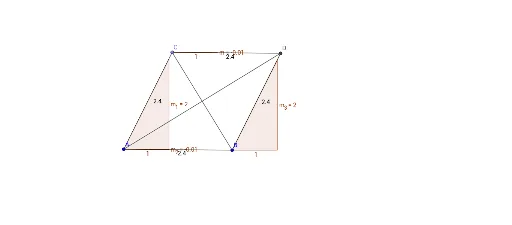
This GeoGebra example demonstrates how to construct a dynamic rhombus using circles, segments, and lines, and explores its connections with ellipses, parabolas, and polynomial functions. Core mathematical concepts include rhombus properties (perpendicular bisecting diagonals, parallel opposite sides), circle tangents, line-circle intersections, slope calculations, and rational numbers. Construction details: using GeoGebra commands Segment, Circle, Point, Line, Intersect, and Slope, the objects A, B, f, c, C, g, h, i, D, j, k, m, m_1, m_2, m_3, l, n are created. By dragging points or adjusting parameters, learners can observe how the rhombus changes and how it relates to function graphs. Suitable for middle or high school geometry classes and exploratory math activities, helping students bridge geometric construction and algebraic representation.
GeoGebra Commands & Parameters
Segment(A, B) → fCircle(A, B) → cPoint(c) → CSegment(A, C) → gLine(C, f) → hLine(B, g) → iIntersect(h, i) → DSegment(C, D) → jSegment(B, D) → kSlope(j) → mSlope(g) → m_1Slope(f) → m_2Slope(k) → m_3Segment(A, D) → lSegment(B, C) → n
AI Drawing Prompt Reference
Draw a dynamic rhombus constructed with two circles and line segments, showing its properties of perpendicular bisecting diagonals and parallel opposite sides, and explore its connections with ellipses, parabolas, and polynomial functions. Start by drawing a line segment, then draw a circle with it as the diameter, take a point on the circle, connect it to the endpoints of the segment, draw parallel lines through the point, intersect them to get a vertex of the rhombus, connect the vertices, and calculate the slopes of the diagonals to observe how the rhombus changes and relates to function graphs.
The prompt above was compiled from the original drawing commands and is for reference only.