
Rhombus Equations
Loading the math board and drawing, please wait…
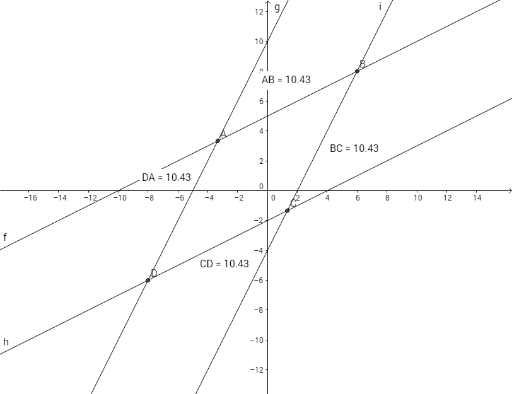
This example demonstrates the equations of a rhombus. Key mathematical concepts include equations, rhombus, ratios, and Pythagoras' theorem. Using GeoGebra commands such as Intersect, Distance, and Midpoint, the example constructs the sides and diagonals of the rhombus and calculates the lengths of the sides and diagonals. Suitable for middle school and above students to learn geometric construction and equation application.
GeoGebra Commands & Parameters
Intersect(f, g) → AIntersect(f, i) → BIntersect(h, i) → CIntersect(g, h) → DDistance(A, B) → distanceABMidpoint(A, B) →Distance(B, C) → distanceBCMidpoint(B, C) →Distance(C, D) → distanceCDMidpoint(C, D) →Distance(D, A) → distanceDAMidpoint(D, A) →
AI Drawing Prompt Reference
Draw a rhombus formed by four intersecting lines. Start with two intersecting lines as one pair of opposite sides, then add two more intersecting lines as the other pair, ensuring both pairs are parallel and equal in length. Mark the four intersection points as vertices, connect adjacent vertices to form the rhombus. Measure and label the length of each side, and find the midpoint of each side, marking them with points. The figure should clearly show the sides, vertices, and midpoints for observing side length relationships.
The prompt above was compiled from the original drawing commands and is for reference only.