
Rhombus Diagonals by Reg
Loading the math board and drawing, please wait…
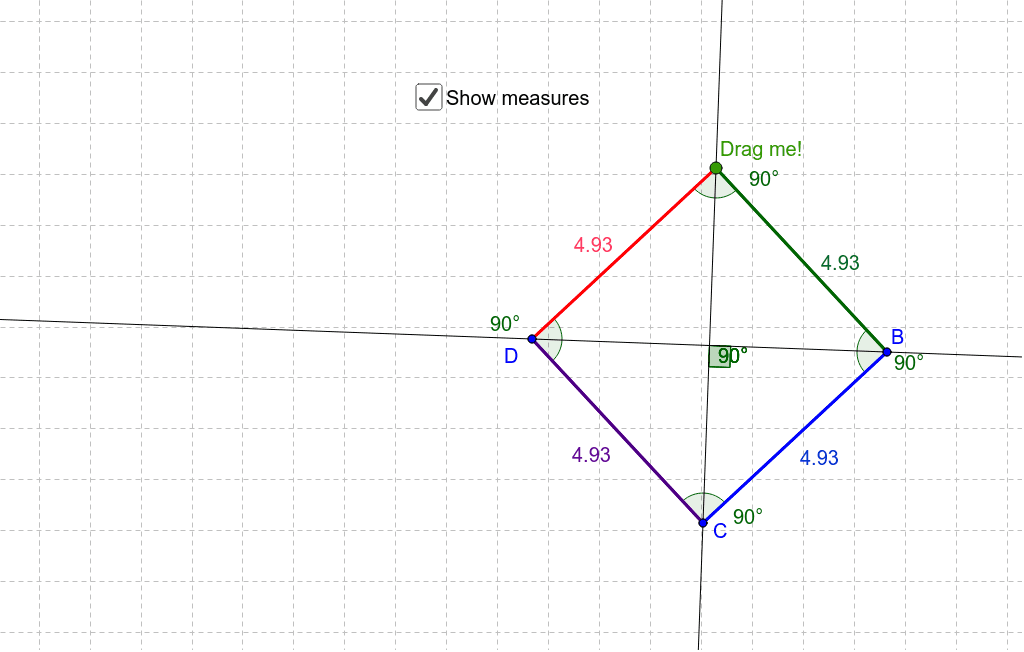
This example demonstrates the properties and relationships of diagonals in a rhombus, including symmetry, perpendicular bisectors, angle bisectors, and vector operations. It uses commands like Segment, Line, Mirror, and Angle to construct points, lines, and angles, showcasing key geometric features. Suitable for high school mathematics education, focusing on rhombus geometry and 3D vector applications.
GeoGebra Commands & Parameters
Segment(A, D) → aLine(A, C_1) → b_1Mirror(A, b_1) → A'Mirror(D, b_1) → BSegment(A', B) → bLine(D, B) → c_1Mirror(A, c_1) → A'_1Mirror(D, c_1) → B'_1Segment(A'_1, B'_1) → dMirror(A', c_1) → CMirror(B, c_1) → B''Segment(C, B'') → cAngle(B, A'_1, D) → αAngle(A, B, A'_1) → βAngle(A'_1, D, A) → γAngle(D, A, B) → δSegment(A, B) → fSegment(B, A'_1) → gSegment(A'_1, D) → hSegment(D, A) → iAngle(b_1, c_1) → εAngle(b_1, c_1) → ζAngle(b_1, c_1) → η
AI Drawing Prompt Reference
Draw a rhombus with its diagonals, showing they bisect each other at right angles and act as angle bisectors. The vertices are obtained by reflecting over the diagonals. Label all four angles. The intersection of the diagonals is the center, connecting these points forms the rhombus, and connecting midpoints of diagonals forms a parallelogram. Label the angles at the intersection of diagonals and show the relationship between diagonals and sides.
The prompt above was compiled from the original drawing commands and is for reference only.