
Rhombus Diagonal Construction Example
Loading the math board and drawing, please wait…
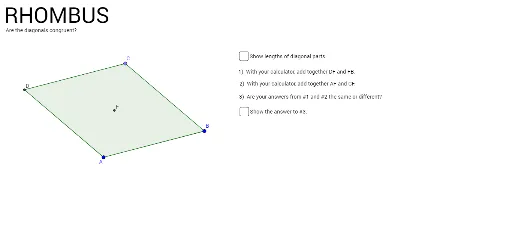
This GeoGebra example dynamically demonstrates the properties of rhombus diagonals: they are perpendicular and bisect each other, and the area can be computed from the diagonal lengths. Core mathematical concepts include the definition of a rhombus, diagonal properties, perpendicular bisectors, area formulas, and angle relationships. Construction steps: use the Segment tool to create side AB, draw a circle centered at A to determine vertex C, construct diagonals via intersection points, generate the rhombus polygon poly1 using the Polygon tool, and measure side lengths, diagonal lengths, and angles (α, β, γ, etc.), with accompanying text labels. Suitable for middle school geometry lessons to help students visualize rhombus diagonal properties and area calculation, and also useful for high school review of basic plane geometry.
GeoGebra Commands & Parameters
Segment(A, B) → fCircle(B, A) → cPoint(c) → CSegment(C, B) → gCircle(C, B) → dCircle(A, B) → eIntersect(d, e, 2) → DSegment(A, D) → hSegment(D, C) → iSegment(D, B) → jSegment(C, A) → kIntersect(j, k) → EAngle(B, E, C) → αAngle(E, B, A) → βAngle(E, A, D) → γAngle(B, A, E) → δAngle(A, D, E) → εAngle(E, D, C) → ζAngle(D, C, E) → ηAngle(E, C, B) → θAngle(C, B, E) → ιSegment(D, B) → mSegment(C, A) → nPolygon(D, C, B, A) → poly1, d_1, c_1, b_1, a_1Segment(D, B) → pSegment(C, A) → qIntersect(p, q) → FSegment(D, F) → rSegment(C, F) → sSegment(F, B) → tSegment(F, A) → f_1Distance(s, r) → o
AI Drawing Prompt Reference
Draw a rhombus to demonstrate that its diagonals are perpendicular and bisect each other. Start by drawing one side, then use the first endpoint as a center to draw a circle to find the second vertex. Next, draw circles centered at the new vertex and the original endpoint, and mark their intersection as the diagonals' intersection point. Connect the vertices to form the rhombus, measure and label the side lengths, diagonal lengths, and all angles to highlight the properties of the diagonals and area calculation.
The prompt above was compiled from the original drawing commands and is for reference only.