
Rhombus Construction with Rotation and Angle Dynamics
Loading the math board and drawing, please wait…
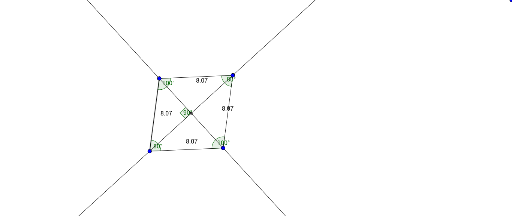
This GeoGebra example demonstrates the dynamic construction of a rhombus, highlighting its geometric properties through rotation and angle manipulation. The core mathematical concepts include the definition of a rhombus (equal sides, opposite equal angles), rotation transformations, angle measurement, and the interplay of vectors and trigonometry. The construction uses commands such as Rotate to transform points, Angle to define angular parameters, Line and Intersect to determine key vertices, and Segment to draw the sides. Multiple objects (A, B, A', B', etc.) and angle variables (α, β, γ, δ) are involved, likely with sliders to animate the rotation, making the transformation visually intuitive. This resource is suitable for middle and high school students learning plane geometry, geometric transformations, and trigonometric applications, as well as for teachers demonstrating rotational symmetry and angle relationships in a classroom setting.
GeoGebra Commands & Parameters
Rotate(A, 80°, B) → A'Angle(A, B, A') → αRotate(B, 100°, A') → B'_1Angle(B, A', B'_1) → βRotate(A', 80°, B'_1) → A''Angle(A', B'_1, A'') → γRotate(B'_1, 100°, A) → CAngle(B'_1, A, C) → δLine(A, A') → jLine(B'_1, B) → kIntersect(j, k) → DAngle(A, D, B'_1) → εSegment(A, B) → fSegment(B, A') → gSegment(A', B'_1) → hSegment(B'_1, A) → i
AI Drawing Prompt Reference
Construct a dynamic rhombus starting with two adjacent vertices. Rotate one vertex around the other by 80 degrees to get a third point, then rotate the second vertex around the third by 100 degrees to get a fourth point, and continue rotating to close the shape. Connect all vertices with equal-length segments to form the rhombus. Draw the two diagonals as extended lines intersecting inside, and label the angles at each vertex. Use sliders to vary the rotation angles, showing that the rhombus maintains equal sides and opposite equal angles under rotation.
The prompt above was compiled from the original drawing commands and is for reference only.