
Rhombus Area and Perimeter Calculation
Loading the math board and drawing, please wait…
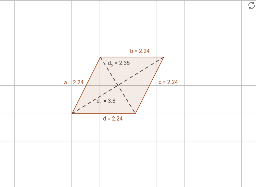
This example demonstrates how to draw a rhombus and calculate its area and perimeter using GeoGebra. Key math concepts include the geometric properties of a rhombus, area formulas (base times height or half the product of diagonals), and perimeter formulas (sum of all four sides). Construction highlights involve commands/objects like Line, Circle, Intersect, Polygon, and Segment. Suitable for middle school students and above for learning geometric constructions and calculations, or for mathematical teaching demonstrations.
GeoGebra Commands & Parameters
Line(B, C) → fLine(A, D) → gCircle(B, Segment[A, B]) → c_1Circle(A, Segment[A, B]) → d_3Intersect(d_3, g, 2) → EIntersect(c_1, f, 2) → FPolygon(A, B, F, E) → poly1, a, b, c, dSegment(A, F) → d_1Segment(B, E) → d_2
AI Drawing Prompt Reference
Draw a rhombus and show the calculation of its area and perimeter. Start by drawing two intersecting diagonals, then draw circles with each diagonal as the diameter. Connect the intersection points of the circles with the diagonals to form the rhombus. Measure the side lengths and diagonals, calculate the area and perimeter using formulas, and label them next to the shape.
The prompt above was compiled from the original drawing commands and is for reference only.