
Revolution Paraboloid
Loading the math board and drawing, please wait…
In collections
geometriadinamica.es
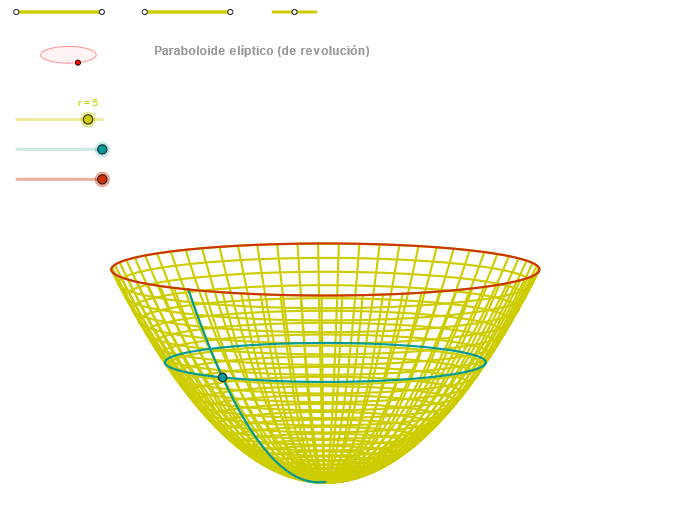
This example demonstrates the generation process of a revolution paraboloid. It involves key mathematical concepts such as the rotation of a parabola, coordinate geometry, and solid geometry. Using GeoGebra commands like Segment, Point, OrthogonalLine, Circle, Intersect, etc., a geometric model of the revolution paraboloid can be constructed. This example is suitable for high school mathematics education, particularly in coordinate geometry and solid geometry.
GeoGebra Commands & Parameters
Segment(Q3, Q4) → p2Point(p2) → P3Segment(P3, Q4) → p4Point(p4) → P4Segment(Q1, Q2) → p1Point(p1) → P1Segment(P1, Q2) → p3Point(p3) → P2OrthogonalLine(C, xAxis) → zz2Circle(C, 0.62) → zz0Intersect(zz0, zz2, 1) → ZZ4Intersect(zz0, zz2, 2) → ZZ3Ellipse(ZZ3, ZZ4, 0.65) → zElipse2Point(zElipse2) → ZIntersect(zElipse2, zz2) → ZZ7, ZZ8Angle(ZZ8, C, Z) → zAngIncOrthogonalLine(C, yAxis) → zz1Intersect(zz0, zz1, 2) → ZZ2Intersect(zz0, zz1, 1) → ZZ1Ellipse(ZZ1, ZZ2, 0.65) → zElipse1Point(zElipse1) → XYIntersect(zElipse1, zz1) → ZZ5, ZZ6Angle(ZZ6, C, XY) → zAngRotSegment(Q5, Q6) → p5Point(p5) → P5CurveCartesian((r * (((0.75 * cos(u)) * sin(zAngRot)) + ((0.75 * sin(u)) * cos(zAngRot)))), (r * ((((-0.75 * cos(u)) * cos(zAngRot)) * sin(zAngInc)) + (((0.75 * sin(u)) * sin(zAngRot)) * sin(zAngInc)) + ((0.75^(2) - 0.6) * cos(zAngInc)))), u, u1, u2) → curva1Segment(ZZ5, ZZ6) → zz4Segment(ZZ7, ZZ8) → zz3Intersect(zElipse2, zElipse1, 1) → zPunto1Intersect(zElipse2, zElipse1, 4) → zPunto2Segment(zPunto1, zPunto2) → zSeg2CurveCartesian((r * (((v * cos(α)) * sin(zAngRot)) + ((v * sin(α)) * cos(zAngRot)))), (r * (((((-v) * cos(α)) * cos(zAngRot)) * sin(zAngInc)) + (((v * sin(α)) * sin(zAngRot)) * sin(zAngInc)) + ((v^(2) - 0.6) * cos(zAngInc)))), v, v1, v2) → curva2Sequence(CurveCartesian[(r * (((v * cos(u)) * sin(zAngRot)) + ((v * sin(u)) * cos(zAngRot)))), (r * (((((-v) * cos(u)) * cos(zAngRot)) * sin(zAngInc)) + (((v * sin(u)) * sin(zAngRot)) * sin(zAngInc)) + ((v^(2) - 0.6) * cos(zAngInc)))), u, u1, u2], v, v1, v2, paso) → list1ACurveCartesian((r * (((β * cos(u)) * sin(zAngRot)) + ((β * sin(u)) * cos(zAngRot)))), (r * (((((-β) * cos(u)) * cos(zAngRot)) * sin(zAngInc)) + (((β * sin(u)) * sin(zAngRot)) * sin(zAngInc)) + ((β^(2) - 0.6) * cos(zAngInc)))), u, u1, u2) → a1Sequence(CurveCartesian[(r * (((v * cos(u)) * sin(zAngRot)) + ((v * sin(u)) * cos(zAngRot)))), (r * (((((-v) * cos(u)) * cos(zAngRot)) * sin(zAngInc)) + (((v * sin(u)) * sin(zAngRot)) * sin(zAngInc)) + ((v^(2) - 0.6) * cos(zAngInc)))), v, v1, v2], u, u1, u2, (3 * paso)) → list1
AI Drawing Prompt Reference
Draw a revolution paraboloid to show its generation process. Start by sketching a parabola, then rotate it around the x-axis and y-axis to form the paraboloid. Pay attention to the intersection points and angle relationships between the parabola and the rotation axes, as well as the elliptical cross-sections formed during rotation. Finally, combine all the rotated curves to create a complete model of the revolution paraboloid.
The prompt above was compiled from the original drawing commands and is for reference only.