
Respiradero Surface: Parametric Surface Construction in GeoGebra
Loading the math board and drawing, please wait…
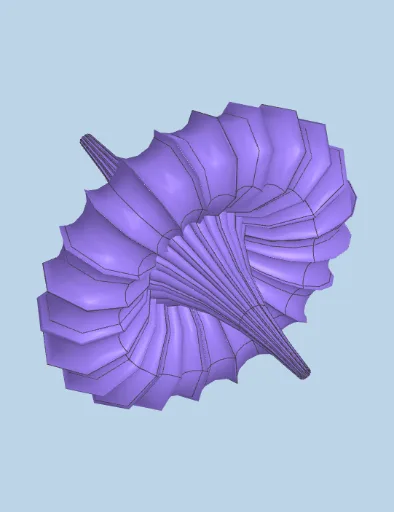
This example demonstrates creating a dynamic "breathing surface" using parametric equations. Key mathematical concepts include: parametric surface equations, geometric transformations, and conic sections generating surfaces. Construction highlights: ①Use Surface command to create parametric surfaces; ②Apply Polygon command for cross-section construction; ③Implement rotation transformations for dynamic surface changes; ④Control surface morphology through slider parameters (a, b, c, d, β, k); ⑤Configure color variables for visualization. Suitable for high school and above students learning parametric surfaces, also ideal for teaching mathematical modeling, geometric transformations, and derivative applications.
GeoGebra Commands & Parameters
Polygon(A, B, C, D) → c1, a_1, b_1, c_1, d_1Surface((-u) + ((((2 * b) * cosh((a * u))) * sinh((a * u)))) / ((a * ((b * cosh((a * u))^(2)) + (a^(2) * sin((c * v))^(2))))), ((((2 * c) * cosh((a * u))) * ((((-c) * cos(v)) * cos((c * v))) - (sin(v) * sin((c * v)))))) / ((a * ((b * cosh((a * u))^(2)) + (a^(2) * sin((c * v))^(2))))), ((((2 * c) * cosh((a * u))) * ((((-c) * sin(v)) * cos((c * v))) + (cos(v) * sin((c * v)))))) / ((a * ((b * cosh((a * u))^(2)) + (a^(2) * sin((c * v))^(2))))), u, (-k), k, v, (-p), p) → superf
AI Drawing Prompt Reference
Create a dynamic breathing surface using parametric equations. First, draw a quadrilateral as the base, then use the Surface command to create the parametric surface. Adjust parameters a, b, c, d, β, and k to change the surface shape. Apply rotation transformations to make the surface dynamic, and use sliders to control color variables for better visualization.
The prompt above was compiled from the original drawing commands and is for reference only.