
Representation of Vectors in 2-Dimensions
Loading the math board and drawing, please wait…
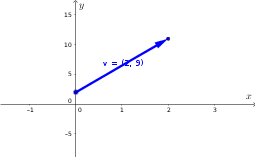
① This example demonstrates how to represent vectors in a two-dimensional plane using dynamic coordinates and vector tools, showing the start point, end point, components, and labels of a vector. ② The core mathematical concepts include coordinate representation of vectors, vector decomposition into horizontal and vertical components, translation and position of vectors in the plane, along with ideas from matrices and function transformations. ③ Construction highlights: From the construction summary, commands such as DynamicCoordinates, If, Corner, and Vector are used; auxiliary points like B_sub and A_sub are created; parameters like xscale, yscale, and threshold control axis scaling and label display; v_x and v_y represent vector components; toggles like show_vlabel and show_points control visual elements. ④ Suitable for high school or early college students learning vectors, coordinate geometry, or exploring dynamic mathematics with GeoGebra, and for teachers creating interactive lessons to help students understand the geometric meaning and coordinate representation of vectors.
GeoGebra Commands & Parameters
DynamicCoordinates(B_sub, If[xBsub < xmin, xmin, If[xBsub > xmax, xmax, xBsub]], If[yBsub < ymin, ymin, If[yBsub > ymax, ymax, yBsub]]) → BDynamicCoordinates(A_sub, If[xAsub < xmin, xmin, If[xAsub > xmax, xmax, xAsub]], If[yAsub < ymin, ymin, If[yAsub > ymax, ymax, yAsub]]) → AshowIf(anchor_A, (0, 0), Ashow) → ACorner(1) → LLCorner(3) → URVector(A, B) → v