
Repeated Rotation of a Polygon
Loading the math board and drawing, please wait…
In collections
Symmetry, Transformation and Tessellation
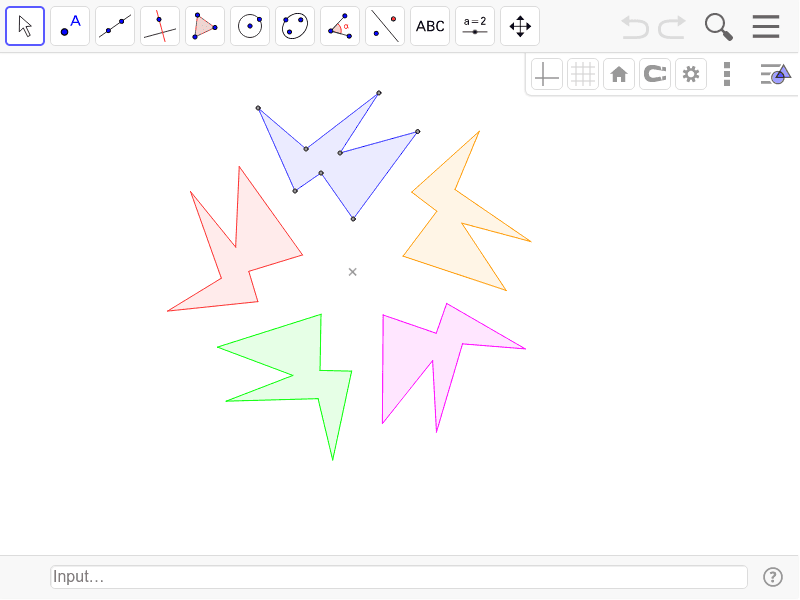
This example demonstrates the repeated rotation of a polygon. The key mathematical concept involved is rotation transformation. Using the Polygon and Rotate commands, the construction of a polygon and its rotated images is illustrated. Suitable for students at the junior high school level and above to learn about geometric transformations.
GeoGebra Commands & Parameters
Polygon(B, C, D, E, F, G, H, I) → s1, b, c, d, e, f, g, h, iRotate(B, 72*°, A) → B'Rotate(C, 72*°, A) → C'Rotate(D, 72*°, A) → D'Rotate(E, 72*°, A) → E'Rotate(F, 72*°, A) → F'Rotate(G, 72*°, A) → G'Rotate(H, 72*°, A) → H'Rotate(I, 72*°, A) → I'Polygon(B', C', D', E', F', G', H', I') → s2, b', c', d', e', f', g', h', i'Rotate(B', 72*°, A) → B''Rotate(C', 72*°, A) → C''Rotate(D', 72*°, A) → D''Rotate(E', 72*°, A) → E''Rotate(F', 72*°, A) → F''Rotate(G', 72*°, A) → G''Rotate(H', 72*°, A) → H''Rotate(I', 72*°, A) → I''Polygon(B'', C'', D'', E'', F'', G'', H'', I'') → s3, b'', c'', d'', e'', f'', g'', h'', i''Rotate(B'', 72*°, A) → B'''Rotate(C'', 72*°, A) → C'''Rotate(D'', 72*°, A) → D'''Rotate(E'', 72*°, A) → E'''Rotate(F'', 72*°, A) → F'''Rotate(G'', 72*°, A) → G'''Rotate(H'', 72*°, A) → H'''Rotate(I'', 72*°, A) → I'''Polygon(B''', C''', D''', E''', F''', G''', H''', I''') → s4, b''', c''', d''', e''', f''', g''', h''', i'''Rotate(B''', 72*°, A) → B''''Rotate(C''', 72*°, A) → C''''Rotate(D''', 72*°, A) → D''''Rotate(E''', 72*°, A) → E''''Rotate(F''', 72*°, A) → F''''Rotate(G''', 72*°, A) → G''''Rotate(H''', 72*°, A) → H''''Rotate(I''', 72*°, A) → I''''Polygon(B'''', C'''', D'''', E'''', F'''', G'''', H'''', I'''') → s5, b'''', c'''', d'''', e'''', f'''', g'''', h'''', i''''
AI Drawing Prompt Reference
Draw a regular polygon and then rotate it around its center point by 72 degrees each time to generate multiple rotated images of the polygon, demonstrating the geometric effect of rotation transformation. Start with the initial polygon and progressively create concentric and rotationally arranged polygons to show the pattern.
The prompt above was compiled from the original drawing commands and is for reference only.