
Relationship Between Apothem and Perimeter of Regular Polygons
Loading the math board and drawing, please wait…
In collections
Regular Polygons
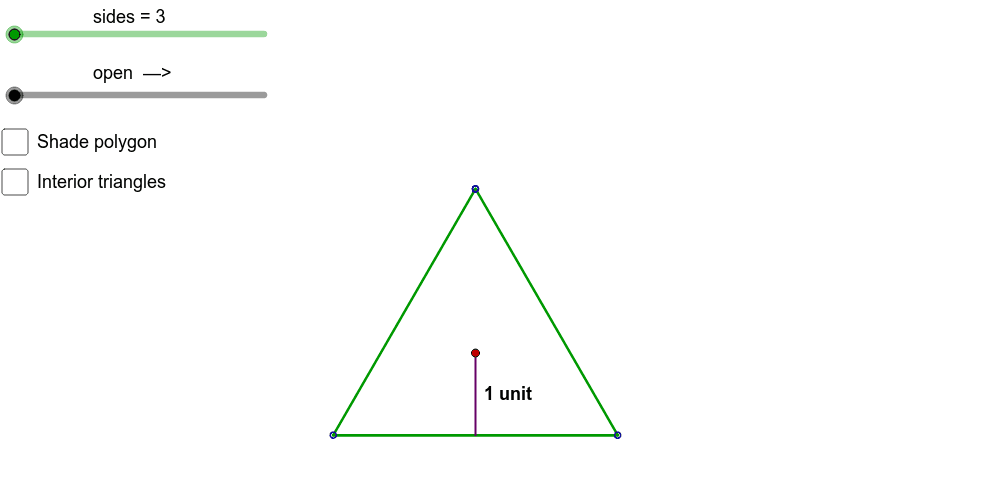
This example explores the relationship between the apothem and perimeter of regular polygons with 3 to 40 sides. By adjusting the number of sides, observe how the apothem affects the perimeter. Key mathematical concepts include regular polygons, apothem, and perimeter. GeoGebra commands used include Rotate, If, Sequence, Distance, Segment, Polygon, and Vector. Suitable for students in middle school and above to learn about polygon properties.
GeoGebra Commands & Parameters
Rotate(Pt1, -α, Pt2) → Pt3RRotate(Pt2, -α, Pt3R) → Pt4RRotate(Pt3R, -α, Pt4R) → Pt5RRotate(Pt4R, -α, Pt5R) → Pt6RRotate(Pt5R, -α, Pt6R) → Pt7RRotate(Pt6R, -α, Pt7R) → Pt8RRotate(Pt7R, -α, Pt8R) → Pt9RRotate(Pt8R, -α, Pt9R) → Pt10RRotate(Pt9R, -α, Pt10R) → Pt11RRotate(Pt10R, -α, Pt11R) → Pt12RRotate(Pt11R, -α, Pt12R) → Pt13RRotate(Pt12R, -α, Pt13R) → Pt14RRotate(Pt13R, -α, Pt14R) → Pt15RRotate(Pt14R, -α, Pt15R) → Pt16RRotate(Pt15R, -α, Pt16R) → Pt17RRotate(Pt16R, -α, Pt17R) → Pt18RRotate(Pt17R, -α, Pt18R) → Pt19RRotate(Pt18R, -α, Pt19R) → Pt20RRotate(Pt19R, -α, Pt20R) → Pt21RRotate(Pt20R, -α, Pt21R) → Pt22RRotate(Pt2, α, Pt1) → Pt3LRotate(Pt1, α, Pt3L) → Pt4LRotate(Pt3L, α, Pt4L) → Pt5LRotate(Pt4L, α, Pt5L) → Pt6LRotate(Pt5L, α, Pt6L) → Pt7LRotate(Pt6L, α, Pt7L) → Pt8LRotate(Pt7L, α, Pt8L) → Pt9LRotate(Pt8L, α, Pt9L) → Pt10LRotate(Pt9L, α, Pt10L) → Pt11LRotate(Pt10L, α, Pt11L) → Pt12LRotate(Pt11L, α, Pt12L) → Pt13LRotate(Pt12L, α, Pt13L) → Pt14LRotate(Pt13L, α, Pt14L) → Pt15LRotate(Pt14L, α, Pt15L) → Pt16LRotate(Pt15L, α, Pt16L) → Pt17LRotate(Pt16L, α, Pt17L) → Pt18LRotate(Pt17L, α, Pt18L) → Pt19LRotate(Pt18L, α, Pt19L) → Pt20LRotate(Pt19L, α, Pt20L) → Pt21LIf(sides > 3, floor(sides / 2), 2) → sidesLIf(sides > 3, ceil(sides / 2) + 1, 2) → sidesRSequence(Segment[Element[pointsR, i], Element[pointsR, i + 1]], i, 0, sidesR) → segmentsRSequence(Segment[Element[pointsL, i], Element[pointsL, i + 1]], i, 0, sidesL) → segmentsLDistance(Element[pointsL, sidesL + 1], Element[pointsR, sidesR + 1]) → openDistanceValueRotate(Center + (0, -2), -α, Pt2) → Center2RRotate(Center + (0, -2), α, Pt1) → Center2LRotate(Center2R, (-open)°, Pt3R) → Center3RRotate(Center3R, (-open)°, Pt4R) → Center4RRotate(Center4R, (-open)°, Pt5R) → Center5RRotate(Center5R, (-open)°, Pt6R) → Center6RRotate(Center6R, (-open)°, Pt7R) → Center7RRotate(Center7R, (-open)°, Pt8R) → Center8RRotate(Center8R, (-open)°, Pt9R) → Center9RRotate(Center9R, (-open)°, Pt10R) → Center10RRotate(Center10R, (-open)°, Pt11R) → Center11RRotate(Center11R, (-open)°, Pt12R) → Center12RRotate(Center12R, (-open)°, Pt13R) → Center13RRotate(Center13R, (-open)°, Pt14R) → Center14RRotate(Center14R, (-open)°, Pt15R) → Center15RRotate(Center15R, (-open)°, Pt16R) → Center16RRotate(Center16R, (-open)°, Pt17R) → Center17RRotate(Center17R, (-open)°, Pt18R) → Center18RRotate(Center18R, (-open)°, Pt19R) → Center19RRotate(Center19R, (-open)°, Pt20R) → Center20RRotate(Center20R, (-open)°, Pt21R) → Center21RSequence(Polygon[Element[pointsR, i], Element[pointsR, i + 1], Element[centersR, i]], i, 0, sidesR) → trianglesRRotate(Center2L, open°, Pt3L) → Center3LRotate(Center3L, open°, Pt4L) → Center4LRotate(Center4L, open°, Pt5L) → Center5LRotate(Center5L, open°, Pt6L) → Center6LRotate(Center6L, open°, Pt7L) → Center7LRotate(Center7L, open°, Pt8L) → Center8LRotate(Center8L, open°, Pt9L) → Center9LRotate(Center9L, open°, Pt10L) → Center10LRotate(Center10L, open°, Pt11L) → Center11LRotate(Center11L, open°, Pt12L) → Center12LRotate(Center12L, open°, Pt13L) → Center13LRotate(Center13L, open°, Pt14L) → Center14LRotate(Center14L, open°, Pt15L) → Center15LRotate(Center15L, open°, Pt16L) → Center16LRotate(Center16L, open°, Pt17L) → Center17LRotate(Center17L, open°, Pt18L) → Center18LRotate(Center18L, open°, Pt19L) → Center19LRotate(Center19L, open°, Pt20L) → Center20LSequence(Polygon[Element[pointsL, i], Element[pointsL, i + 1], Element[centersL, i - 1]], i, 0, sidesL) → trianglesLSegment(Center + (0, 0), Center + (0, -1)) → apothemSegmentSegment(Element[pointsR, sidesR + 1] + (0.05, 0), Element[pointsR, sidesR + 1] + (0.55, 0)) → altitudeHashBSegment(Element[pointsR, sidesR + 1] + (0.05, 1), Element[pointsR, sidesR + 1] + (0.55, 1)) → altitudeHashTPolygon(Pt1PolyOutline, Pt2PolyOutline, sides) → polygonOutline, a_1, h, i, j, k, l, m, n, p, q, r, pt1polyoutline, s, t, b_1, c_1, d_1, e_1, f_1, g_1, h_1, i_1, a, j_1, k_1, l_1, m_1, n_1, p_1, q_1, r_1, s_1, t_1, b, a_2, A, B, C, D, E, F, G, H, I, c, J, K, L, M, N, O, P, Q, R, S, d, T, U, V, W, Z, A_1, B_1, C_1, D_1, E_1, e, F_1, G_1, H_1, I_1, J_1, K_1, L_1, M_1, N_1, f, gVector((x(Center), -0.25), (x(Element[pointsL, sidesL + 1]), -0.25)) → openDistanceVectorLVector((x(Center), -0.25), (x(Element[pointsR, sidesR + 1]), -0.25)) → openDistanceVectorRVector(Midpoint[Element[pointsR, sidesR + 1] + (0.3, 0), Element[pointsR, sidesR + 1] + (0.3, 1)], Element[pointsR, sidesR + 1] + (0.3, 0)) → altitudeVectorBVector(Midpoint[Element[pointsR, sidesR + 1] + (0.3, 0), Element[pointsR, sidesR + 1] + (0.3, 1)], Element[pointsR, sidesR + 1] + (0.3, 1)) → altitudeVectorTSegment((x(Element[pointsL, sidesL + 1]), -0.1), (x(Element[pointsL, sidesL + 1]), -0.4)) → openDistanceEndLSolidSegment((x(Element[pointsR, sidesR + 1]), -0.1), (x(Element[pointsR, sidesR + 1]), -0.4)) → openDistanceEndRSolid
AI Drawing Prompt Reference
Draw a regular polygon and show the relationship between the length of the central line segment (from the center to the side) and the perimeter of the polygon. By changing the number of sides, observe how the length of the central line segment affects the perimeter. The relationship can be visualized by rotating and segmenting, starting with the regular polygon, then calculating and displaying the length of the central line segment and the perimeter, and finally emphasizing the symmetry of the polygon and the role of the central line segment through rotations and segmentations.
The prompt above was compiled from the original drawing commands and is for reference only.