
Fraction Subtraction Estimation Practice: Compare Differences to a Benchmark
Loading the math board and drawing, please wait…
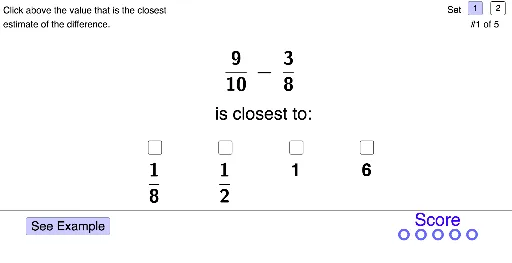
① This interactive GeoGebra example demonstrates how to estimate whether the difference of two fractions is less than or greater than a given benchmark number (e.g., 1/2), providing immediate feedback and visual examples of estimation strategies. ② Core mathematical concepts include fraction subtraction, comparison of rational numbers, estimation and approximation, and number sense, involving arithmetic operations, fractions, and inequalities. ③ Construction details: Based on the construction summary, the example uses GeoGebra commands such as If, Polygon, FractionText, Ellipse, Vector, Segment, and Sequence, with objects like AnsNotePolyPt, set, problem, sumBenchmarkSet1/2, sumBenchmarkValue, SR1-SR4, SRSkip, ansCorrect, ansSkip, sr1-sr4, SkipCorrectPt, AnsSelectedPt, SRSelect, example, directions, probTextClosestTo, probNumberTotal, ExPt, NextPt, nextPoly series, buttonNext, term1num, term2num, and term1denom to generate problems, display fraction text, and create interactive buttons and feedback graphics. ④ Suitable for upper elementary to middle school students, this resource can be used in classroom practice, homework, or as a teacher demonstration tool to help learners intuitively grasp fraction subtraction estimation.
GeoGebra Commands & Parameters
If(set ≟ 1, Element[sumBenchmarkSet1, problem], Element[sumBenchmarkSet2, problem]) → sumBenchmarkValueIf(set ≟ 1, {0, 0, 0, 0, 0, 0, 0, 0, 0, 0}, {0, 1, 0, 0, 1, 0, 0, 0, 0, 0}) → SR1If(set ≟ 1, {0, 0, 0, 0, 0, 0, 0, 0, 0, 0}, {1, 0, 0, 0, 0, 0, 0, 0, 0, 0}) → SR2If(set ≟ 1, {1, 0, 0, 0, 0, 0, 0, 0, 0, 0}, {1, 1, 0, 1, 0, 0, 0, 0, 0, 0}) → SR3If(set ≟ 1, {1, 0, 0, 0, 0, 0, 0, 0, 0, 0}, {0, 0, 0, 1, 1, 0, 0, 0, 0, 0}) → SR4If(set ≟ 1, {2, 1, 4, 2, 3, 1, 1, 1, 1, 1}, {2, 1, 2, 4, 3, 1, 1, 1, 1, 1}) → ansCorrectIf(Element[ansCorrect, problem] ≟ 1, (2, 1.8), If[Element[ansCorrect, problem] ≟ 2, (8, 1.8), If[Element[ansCorrect, problem] ≟ 3, (14, 1.8), (20.1, 1.8)]]) → SkipCorrectPtIf(ansSkip ≟ 1, SkipCorrectPt, If[sr1, (5.9, 1.9), If[sr2, (9.3, 1.9), If[sr3, (12.65, 1.9), If[sr4, (16, 1.9)]]]]) → AnsSelectedPtIf(sr1, SR1, If[sr2, SR2, If[sr3, SR3, SR4]]) → SRSelectPolygon(NextPt + (0, 0.2), NextPt + (0.2, 0), NextPt + (2, 0), NextPt + (2, -0.5), NextPt + (4, 0.5), NextPt + (2, 1.5), NextPt + (2, 1), NextPt + (0.2, 1), NextPt + (0, 0.8)) → nextPoly, nextPoly_2, nextPoly_3, nextPoly_4, nextPoly_5, nextPoly_6, nextPoly_7, nextPoly_8, nextPoly_9, nextPoly_{10}If(set ≟ 1, {9, 5, 5, 5, 5, 1, 1, 1, 1, 1}, {1, 12, 11, 8, 14, 1, 1, 1, 1, 1}) → term1numIf(set ≟ 1, {3, 2, 3, 3, 2, 1, 1, 1, 1, 1}, {7, 9, 5, 9, 4, 1, 1, 1, 1, 1}) → term2numIf(set ≟ 1, {10, 8, 6, 9, 7, 1, 1, 1, 1, 1}, {10, 11, 12, 3, 5, 1, 1, 1, 1, 1}) → term1denomIf(set ≟ 1, {8, 7, 16, 11, 9, 1, 1, 1, 1, 1}, {9, 10, 8, 8, 7, 1, 1, 1, 1, 1}) → term2denomPolygon(ProbSetSelect1Pt, ProbSetSelect1Pt + (0.5, 0), ProbSetSelect1Pt + (0.5, 0.5), ProbSetSelect1Pt + (0, 0.5)) → probSetSelect1Poly, probSetSelect1polySeg, probSetSelect1polySeg_1, probSetSelect1polySeg_2, probSetSelect1polySeg_3Polygon(ProbSetSelect2Pt, ProbSetSelect2Pt + (0.5, 0), ProbSetSelect2Pt + (0.5, 0.5), ProbSetSelect2Pt + (0, 0.5)) → probSetSelect2Poly, probSetSelect2polySeg_1, probSetSelect2polySeg_2, probSetSelect2polySeg_3, probSetSelect2polySegIf(set ≟ 1, {0, 0, 0, 0, 0, 0, 0, 0, 0, 0}, {2, 0, 3, 0, 0, 0, 0, 0, 0, 0}) → term1mixedWholeIf(set ≟ 1, {0, 0, 0, 0, 0, 0, 0, 0, 0, 0}, {0, 0, 2, 0, 1, 0, 0, 0, 0, 0}) → term2mixedWholeIf(sr1, 1, If[sr2, 2, If[sr3, 3, If[sr4, 4, 0]]]) → srSelectIf(srSelect ≟ Element[ansCorrect, problem], 1, 0) → correctPolygon(AnsSelectedPt + If[Element[SRSelect, problem] ≟ 0, (0, 0), (0, 0.8)], AnsSelectedPt + (2, 0) + If[Element[SRSelect, problem] ≟ 0, (0, 0), (0, 0.8)], AnsSelectedPt + (2, 2.5), AnsSelectedPt + (0, 2.5)) → ansSelectedPoly, ansSelectedPolyBottom, ansSelectedPolyR, ansSelectedPolyTop, ansSelectedPolyLIf(sr1 ∨ sr2 ∨ sr3 ∨ sr4, true, false) → ansSelectedIf(set ≟ 1, {1, 0.5, 1, 0.5, 0.6666666666666666, 1, 1, 1, 1, 1}, {2, 1, 4, 3, 3, 1, 1, 1, 1, 1}) → term1BenchmarkIf(set ≟ 1, {0.5, 0.25, 0.25, 0.25, 0.3333333333333333, 1, 1, 1, 1, 1}, {1, 1, 2.5, 1, 1.5, 1, 1, 1, 1, 1}) → term2BenchmarkFractionText(If[set ≟ 1, Element[sumBenchmarkSet1, problem], Element[sumBenchmarkSet2, problem]]) → sumBenchmarkIf(Element[ansCorrect, problem] ≟ 1, (6.9, 3.8), If[Element[ansCorrect, problem] ≟ 2, (10.25, 3.8), If[Element[ansCorrect, problem] ≟ 3, (13.65, 3.8), (17, 3.8)]]) → CorrectEllipsePt2Ellipse(CorrectEllipsePt1, CorrectEllipsePt2, CorrectEllipsePt3) → correctEllipseVector((14.5, 0.5), (13.7, 1)) → exCorrectArrowSegment((17.3, 8), (19.7, 8)) → exSegBenchmarkSegment((12.8, 8), (16.4, 8)) → exSegOriginalVector(CorrectEllipsePt2 + (1.9, 0), CorrectEllipsePt2 + (0.9, 0)) → ansNoteIncCorrVectorPolygon(AnsNotePolyPt + (0, If[sumBenchmarkValue ≥ 1, 0.5, 0]), AnsNotePolyPt + (7, If[sumBenchmarkValue ≥ 1, 0.5, 0]), AnsNotePolyPt + (7, 5), AnsNotePolyPt + (0, 5)) → ansNotePoly, ansNotePolySegBottom, ansNotePolySegR, ansNotePolySegTop, ansNotePolySegLIf(set ≟ 1, {-1, -1, -1, -1, -1, -1, -1, -1, -1, -1}, {-1, 0, 1, -1, 0, -1, -1, -1, -1, -1}) → SR1wholeIf(set ≟ 1, {-1, -1, -1, -1, -1, -1, -1, -1, -1, -1}, {1, -1, 1, -1, -1, -1, -1, -1, -1, -1}) → SR2wholeIf(set ≟ 1, {1, -1, -1, -1, -1, -1, -1, -1, -1, -1}, {2, 1, 2, 1, 1, -1, -1, -1, -1, -1}) → SR3wholeIf(set ≟ 1, {6, -1, -1, -1, -1, -1, -1, -1, -1, -1}, {-1, -1, 2, 2, 13, -1, -1, -1, -1, -1}) → SR4wholeIf(set ≟ 1, {2, 2, 10, 4, 4, 1, 1, 1, 1, 1}, {0, 2, 2, 8, 2, 1, 1, 1, 1, 1, 1}) → SR2denomIf(set ≟ 1, {1, 1, 2, 1, 1, 1, 1, 1, 1, 1}, {-1, 1, 1, 3, 1, 1, 1, 1, 1, 1}) → SR2numIf(set ≟ 1, {8, 4, 16, 9, 8, 1, 1, 1, 1, 1}, {9, 0, 8, 5, 0, 1, 1, 1, 1, 1}) → SR1denomIf(set ≟ 1, {1, 1, 1, 1, 1, 1, 1, 1, 1, 1}, {6, -1, 1, 1, -1, 1, 1, 1, 1, 1}) → SR1numIf(set ≟ 1, {-1, 3, 1, 3, 1, 1, 1, 1, 1, 1}, {-1, -1, 1, -1, 1, 1, 1, 1, 1, 1}) → SR3numIf(set ≟ 1, {-1, 4, 2, 4, 3, 1, 1, 1, 1, 1}, {-1, -1, 2, -1, 2, 1, 1, 1, 1, 1}) → SR3denomIf(set ≟ 1, {-1, 3, 3, 2, 3, 1, 1, 1, 1, 1}, {14, 7, 3, -1, -1, 1, 1, 1, 1, 1}) → SR4numIf(set ≟ 1, {-1, 1, 4, 2, 4, 1, 1, 1, 1, 1}, {1, 5, 4, -1, -1, 1, 1, 1, 1, 1}) → SR4denomSequence((17.8 + i, 0.6), i, 1, 4.5, 0.81) → scorePtsEmptySequence((17.8 + i, 0.6), i, 1, scoreTotal, 0.81) → scorePts
AI Drawing Prompt Reference
Create an interactive graphic for fraction subtraction estimation practice, including two fractions with their numerators and denominators, and a benchmark number 1/2. Users input two fractions, calculate their difference, and determine if the difference is less than or greater than 1/2. The graphic includes arrows, ellipses, polygons, and segments to display the calculation results and feedback. Fractions are shown as text, and arrows and ellipses indicate the correct direction.
The prompt above was compiled from the original drawing commands and is for reference only.